
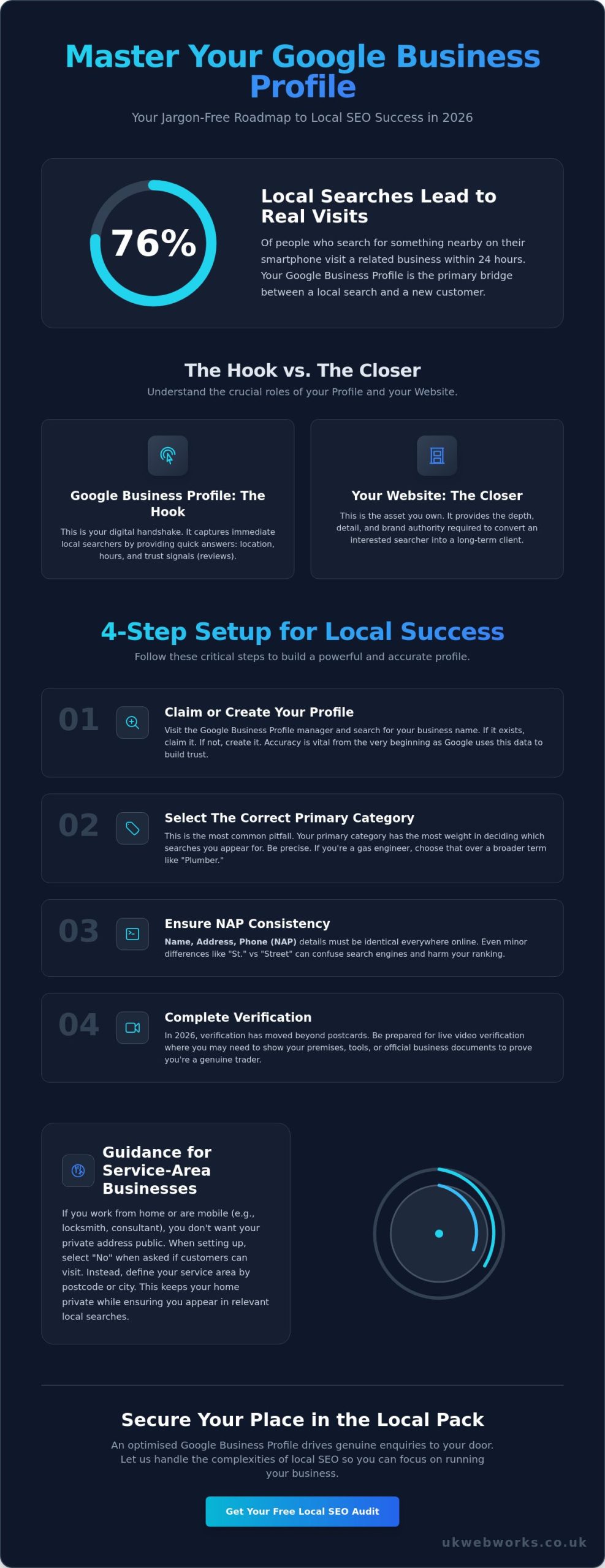
Did you know that 76% of people who search for something nearby on their smartphone visit a related business within 24 hours? You probably already feel the pressure to be visible online, yet managing a google my business business profile often feels like a chore. It’s common to feel stuck with confusing verification steps or frustrated when your shop’s details look different on every website you visit. You want to spend your time running your company, not chasing digital ghosts.
We believe local SEO should be transparent and accessible. This guide provides a jargon-free roadmap to claim, verify, and optimise your profile for 2026. We will show you how to resolve inconsistent information and handle reviews with confidence. By the end of this article, you’ll have the tools to secure your place in the Local Pack and drive more genuine enquiries to your front door. Let’s get your business the visibility it deserves without the usual agency fluff.
Key Takeaways
- Learn the correct way to claim and verify your profile, including how to avoid the category selection errors that often trip up local business owners.
- Discover how to write a compelling, jargon-free description and use professional imagery to stand out from your local competitors.
- Master a straightforward strategy for collecting honest reviews to build the social proof that drives more enquiries to your google my business business listing.
- Understand how to integrate your profile with your website’s SEO to ensure your map ranking remains strong throughout 2026 and beyond.
What is a Google My Business Profile in 2026?
Your Google Business Profile is the official digital shopfront for your company on Google Maps and Search. It is no longer just a static listing with a phone number; it has evolved into the primary bridge between a local search query and a confirmed customer enquiry. When someone in your town searches for a service you provide, this profile is often the first interaction they have with your brand. We view it as a digital handshake that happens before you even pick up the phone.
By 2026, the “Local Pack” has become the most valuable real estate on the internet for small businesses. This is the block of three map results that appears at the top of the search results page. On mobile devices, which now account for over 60% of all UK web traffic, the Local Pack frequently dominates the entire first screen. If you aren’t visible here, you’re effectively invisible to a huge portion of your local market. Within the broader Google Business Profile ecosystem, this tool remains a free resource provided by Google, but it requires a consistent strategy to perform well. You cannot simply set it and forget it. It takes time, regular updates, and genuine engagement to outrank your competitors.
The Difference Between a Website and a Business Profile
We often tell our clients that your profile acts as the “hook” while your website acts as the “closer.” The profile provides quick answers: are you open, where are you located, and do people trust you? However, you can’t rely on a profile alone for long-term brand authority. A profile is a rented space on Google’s platform, whereas your website is an asset you own. Your profile captures the immediate need of a local searcher, while your bespoke website provides the depth and detail required to secure a long-term client.
Naming Confusion: Google My Business vs. Google Business Profile
Google has a habit of rebranding its tools, which often leads to confusion for busy business owners. The platform was known as Google My Business for years before being simplified to Google Business Profile. Despite this change, the term google my business business remains a common way for people to find management settings and advice. We don’t get hung up on the jargon; what matters is how the tool works for you. The most significant shift in recent years is that you now manage your listing directly within Google Search or the Maps app rather than using a separate dashboard. This change makes it easier to post updates and respond to reviews on the go, keeping your google my business business presence active and transparent for your local audience.
How to Set Up Your Google My Business Profile for Success
Setting up your google my business business profile is the first step toward local visibility. It isn’t just about filling in boxes; it’s about digital craftsmanship. Start by visiting the Google Business Profile manager and signing in with your company email. Search for your business name first. If a listing already exists, you’ll need to claim it. If not, you’ll create a new one from scratch. Accuracy at this stage is vital because Google uses this data to build trust in your brand.
Choosing your primary category is the most common pitfall for beginners. Google uses this single choice to decide which searches you appear in. If you’re a gas engineer, don’t just pick “Plumber” because it feels broader. Be precise. You can add secondary categories later, but the primary one carries the most weight. For a deeper dive into these mechanics, this comprehensive guide to Google Business Profile provides excellent technical context for your setup.
Consistency in your Name, Address, and Phone number (NAP) is non-negotiable. Your details must be identical everywhere, from your website to local directories. Even a small discrepancy like “St.” versus “Street” can confuse search engine crawlers. In 2026, verification has moved beyond the classic 14-day postcard wait. You’ll likely be asked for a live video verification. This involves showing your premises, your tools, or your official business registration on camera to prove you’re a genuine UK trader.
Guidance for Service-Area Businesses
If you’re a mobile locksmith or a consultant working from a home office in Leeds, you don’t want your private address public. When setting up your google my business business profile, select “No” when asked if you have a location customers can visit. Instead, define your service area by postcode or city radius. This keeps your home life private while ensuring you show up for local searches. If you’re unsure how to balance privacy with visibility, our team can help you map out a strategy that works for your specific trade. For businesses operating across the region, our guide to SEO Yorkshire explains how to build organic visibility across multiple local areas without confusing Google’s algorithms.
Verification Troubleshooting: What to Do if You Get Stuck
Delays usually happen because your data doesn’t match official records. Google cross-references your details with Companies House or HMRC documents. If your profile says “Smith & Co” but your registration says “Smith and Company Limited,” you’ll likely face a manual review. Ensure every character is accurate before hitting submit. If you’re stuck for more than 5 working days, use the “Contact Us” feature in the help menu to request a manual review from a support agent. Clean data is the foundation of a successful profile.
Optimising Your Profile to Outrank Local Competitors
Setting up your profile is only the first step. To actually win new customers, you need to refine every detail so Google recognises you as the most relevant result in your area. Your business description should be a clear, honest summary of what you do. We recommend focusing on the specific problems you solve for your customers rather than just listing your job titles. While it is important to mention your location and core services, avoid the temptation to cram in every possible search term. This practice, known as keyword stuffing, makes your profile look unprofessional and can lead to penalties from Google.
Your “Services” and “Products” sections are vital for showing potential clients exactly what they can expect. If you are a landscape gardener in Surrey, don’t just list “Gardening” as a service. Break it down into “Bespoke Patio Design,” “Hedge Trimming,” and “Seasonal Planting Plans.” Specificity helps Google match your google my business business profile to very specific search queries. You should also take advantage of attributes. These small tags tell customers if you offer online appointments, if your premises are wheelchair accessible, or if yours is a women-led business. These details often act as the final nudge a customer needs to choose you over a competitor.
The Strategic Use of Keywords in Your Profile
Effective SEO starts with understanding how your local customers actually speak. They might not search for “Residential Fenestration Experts”; they search for “double glazing repairs near me.” You should identify these natural phrases and weave them into your business description and regular updates. We find that focusing on three to five core terms works best for most UK small businesses. Be careful not to cross the line into over-optimisation. In 2025, Google updated its spam filters to be more aggressive against profiles that repeat city names or service keywords excessively. If your description reads like a list rather than a conversation, you risk a profile suspension. To understand how professional keyword research fits into a broader campaign, it’s worth learning what an organic SEO agency actually does to build sustainable visibility for local businesses.
Visual Storytelling for Small Businesses
High-quality imagery is no longer optional for a successful google my business business presence. In 2026, customers expect to see the people behind the brand. Uploading clear photos of your team, your physical workspace, and your completed projects provides the social proof that modern buyers crave. Short video clips have also become a major engagement driver. A 10-second video of a finished kitchen renovation or a “behind the scenes” look at your workshop can increase profile clicks by 25% compared to static images alone. Authentic photography builds an immediate layer of trust that generic stock images simply cannot replicate.
- Team Photos: Introduce the faces your customers will meet.
- Project Gallery: Show the “before and after” of your best work.
- Action Shots: Capture your team in the middle of a job to demonstrate your process.
Managing Your Profile: Reviews, Posts, and Daily Interaction
Setting up your profile is only the first step. To truly succeed, you must treat your google my business business presence as a living shop front. According to 2024 data from Qualtrics, 93% of consumers read online reviews before making a purchase. This isn’t just about vanity; it’s about social proof. When potential clients see a steady stream of recent, positive feedback, it reduces their perceived risk. It signals that you are active, reliable, and consistent in your delivery.
Don’t wait for feedback to happen by accident. A proactive strategy is essential. BrightLocal research indicates that 70% of people will leave a review if you simply ask them. We recommend sending a direct link via email or SMS within 24 hours of completing a job. Keep the request short and honest. You don’t need a complex script; just let them know that their feedback helps your small business grow and helps other local customers find you.
Negative reviews are inevitable as you scale, but they aren’t a disaster. In fact, 45% of consumers say they are more likely to visit a business that responds to negative feedback professionally. View these as an opportunity to show your integrity. Avoid the temptation to get defensive. A calm, transparent response shows that you take accountability and care about your reputation.
The Art of the Professional Review Response
You should respond to every single review. It shows Google and your customers that you’re paying attention. For a five-star review, keep it jargon-free and personal:
- “Hi [Name], thank you for the five-star rating. We’re glad you enjoyed the [Service/Product]. It was a pleasure working with you, and we hope to see you again soon.”
When de-escalating a complaint, the goal is to move the conversation offline immediately. Acknowledge the issue without getting into a digital shouting match. State clearly: “We’re sorry your experience didn’t meet our usual standards. Please call us on [Phone Number] so we can discuss this and make it right.” This approach protects your brand while showing onlookers that you are a reasonable professional.
Keeping Your Profile Active with Google Posts
Think of Google Posts as a mini-blog for your business. For UK companies, the posts that drive the most engagement include limited-time offers, local event announcements, or behind-the-scenes looks at your craftsmanship. These updates appear directly in search results, giving you extra digital real estate for free.
Since these updates are essentially social content, many businesses explore Social Media Management to ensure their brand voice remains consistent across both search results and social platforms.
- The Schedule: Aim for one post per week. This frequency is manageable and keeps your profile looking fresh.
- The Signal: Regular activity tells Google’s algorithm that your business is operational and reliable. Profiles with weekly updates see significantly higher engagement rates than those left dormant for months.
Consistent interaction builds a layer of trust that a static website simply can’t match. If you want to ensure your profile stays ahead of the competition, get in touch with our local experts for straightforward, honest advice.
Beyond the Profile: Integrating GBP into Your SEO Strategy
Your profile is your digital shop window, but it doesn’t work in isolation. Google looks at your entire digital footprint to decide where you rank in the local map pack. If your profile claims you’re a plumber in Leeds but your website is slow, outdated, or lacks relevant content, your ranking will suffer. Your website provides the “proof” that your profile is legitimate. Statistics from 2024 show that businesses with a complete profile and a linked, high-performing website receive 70% more visits than those without. Setting up your google my business business profile correctly creates the spark, but your website’s SEO keeps the fire burning. Working with a dedicated organic SEO agency can help you build the long-term content authority that turns profile clicks into confirmed enquiries.
Tracking your progress is vital to ensure your efforts pay off. Inside your profile manager, the “Performance” tab offers a direct look at how customers find you. You can see the exact search terms people used and whether they clicked for directions, called your team, or visited your site. In 2026, these insights are more granular, allowing you to see which specific photos or posts triggered the most engagement. Reviewing this data once a month prevents you from wasting time on tactics that don’t convert. Once you have a clear picture of your organic performance, it’s also worth understanding the SEO vs PPC trade-offs to decide whether paid search could complement your local visibility efforts.
Why Bespoke Web Design Matters for Local Conversion
A generic template might get you online, but it won’t keep a local customer engaged. When someone clicks the “Website” button on your profile, they expect a seamless transition. Using bespoke website design ensures your site loads in under 2 seconds and fits every screen size perfectly. Since 61% of mobile searchers are more likely to contact a local business if they have a mobile-friendly site, speed and layout aren’t optional. A professional, custom site mirrors the trust your Google reviews have already built.
Building Long-Term Authority
Local rankings are competitive, and a “set and forget” approach will see you overtaken by more active competitors within 3 to 6 months. To maintain your position, you need to combine your profile management with a managed SEO strategy that builds authority beyond your immediate postcode. For those who want to see how expert agencies scale this process, you can explore Suchmaschinenoptimierung (SEO) with the team at Urban Xperience. This involves regular content updates, backlink building, and technical health checks. If you’re ready to stop guessing and start growing, contact UK Web Works for a jargon-free audit of your digital footprint. We’ll show you exactly where your google my business business presence stands and how to improve it.
- Verify that your NAP (Name, Address, Phone) matches exactly on your site and profile.
- Ensure your website home page includes a map embed of your GBP location.
- Check that your mobile site speed is under 2.5 seconds (LCP).
- Set a recurring calendar reminder to post one update to your profile every 7 days.
- Respond to every review, both positive and negative, within 48 hours.
Take Control of Your Local Search Presence
Winning at local search in 2026 requires more than a basic listing. You’ve seen how a properly structured google my business business profile acts as your essential digital shopfront. Success comes down to two main pillars: consistent interaction through reviews and a profile that’s fully integrated with your wider SEO strategy. BrightLocal’s 2024 research indicates that 87% of consumers used Google to evaluate local businesses, making your profile the first point of contact for the majority of your customers.
Managing your digital footprint shouldn’t be a headache. We focus on providing UK-based expert support that keeps things simple and jargon-free. If your profile is attracting clicks but your website is falling behind, it’s time to bridge that gap. We offer fixed-price project fees so you can plan your budget with total transparency and zero hidden costs. It’s about building a reliable foundation that works as hard as you do. Before committing your entire marketing budget to one channel, it’s worth reading our guide on SEO vs PPC for UK businesses in 2026 to ensure you’re allocating spend where it delivers the strongest return.
Need a professional website to match your Google profile? Explore our bespoke web design services.
Your local growth starts with these practical steps. Let’s get your business moving in the right direction.
Frequently Asked Questions
Is a Google Business Profile really free for all businesses?
Yes, creating and managing a Google Business Profile is completely free for every business. There are no subscription fees or hidden setup costs involved in listing your company on the platform. While Google offers paid advertising through Google Ads, the core features of your google my business business presence remain free of charge. This allows you to reach local customers without any impact on your monthly marketing budget.
Can I have a Google My Business profile without a physical shop or office?
You can definitely have a profile even if you don’t have a physical shopfront. If you provide services at a customer’s location, you simply list yourself as a Service Area Business. This is perfect for UK tradespeople like plumbers or mobile hairdressers. You just need to specify the areas you cover, such as a 20 mile radius from your home base, while keeping your private address hidden from public view.
How long does it typically take to verify a new business profile?
Most UK businesses receive their verification code via a physical postcard within 5 to 7 working days. In some cases, it can take up to 14 days depending on Royal Mail delivery times. Once you enter the 5 or 6 digit code into your dashboard, your profile usually goes live within 24 hours. Google also offers video verification for some sectors, which can speed up the process to just a few hours.
What should I do if someone leaves a fake or malicious review on my profile?
You should flag any review that violates Google’s policies by using the “Report review” tool in your dashboard. Google typically assesses these reports within 3 working days to see if they contain spam or offensive content. If the review doesn’t violate specific rules, we recommend replying professionally to show other customers that you care about your reputation. It’s often better to bury one bad review under 10 fresh, positive ones.
Does having a Google Business Profile help my main website rank higher in search results?
Yes, a well-optimised profile is a major signal that helps your website rank higher in local search results. Google uses the information from your google my business business listing to verify your location and services. This builds trust in your brand. Research shows that businesses with complete profiles are 70% more likely to attract location-based visits, which naturally increases the traffic and authority of your primary website over time. If you’re based in the north of England, our dedicated guide to SEO Yorkshire for local businesses in 2026 explains how to combine profile optimisation with a broader organic search strategy to maximise your regional visibility.
Can I manage multiple business locations from a single Google account?
You can manage hundreds of different locations from one single Google account. If you have more than 10 locations, you can use the “bulk verification” tool to speed things up. We suggest creating “Business Groups” to keep your locations organised and to share management access with your team members. This keeps everything transparent and ensures you don’t need multiple logins for different branches of your company.
Why has my Google Business Profile been suspended and how do I fix it?
Suspensions usually happen because of a policy violation, such as using a PO Box address or making too many rapid changes to your data. To fix this, you must first identify the error and then submit a reinstatement request through the official Google form. You’ll need to provide proof of your business, like a utility bill or a UK VAT registration certificate. Google’s support team typically responds to these requests within 2 to 3 weeks.
How often should I be updating my profile with new photos or posts?
We recommend updating your profile with at least one new post or photo every 7 days. Regular updates signal to Google that your business is active and reliable. Profiles that post fresh content weekly see up to 5 times more engagement than those that remain static for months. It’s a simple way to keep your customers informed about new offers or projects without spending a penny on marketing.