
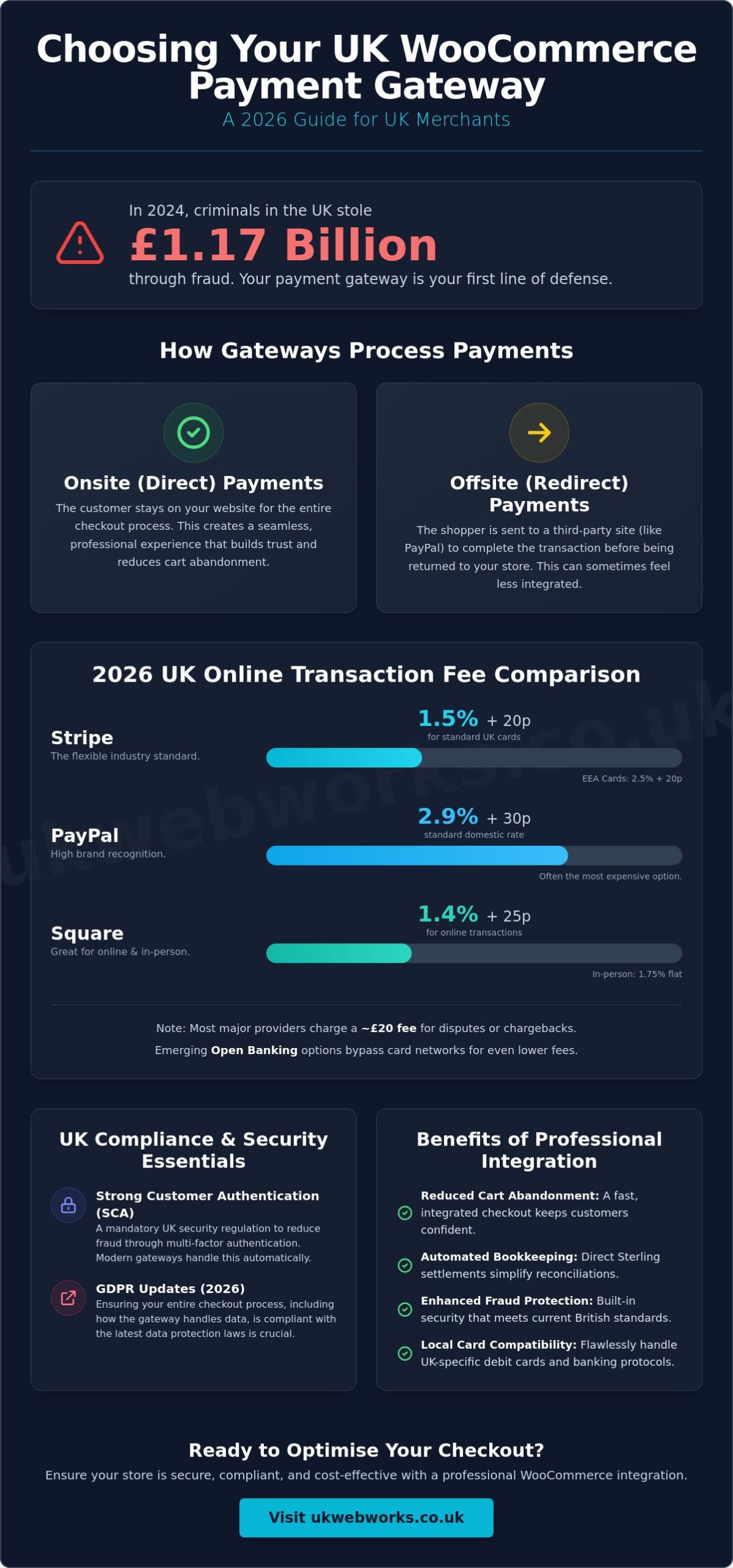
In 2024, criminals in the UK stole £1.17 billion through fraud. That is a sobering figure for any online business owner. It shows that your choice of checkout isn’t just a technical detail; it’s the frontline of your business’s security and reputation. We know that managing woocommerce payment gateway integration uk often feels like a minefield of confusing transaction fees and complex regulations like SCA or the 2026 GDPR updates.
You want a checkout that looks professional, keeps costs low, and works every time without technical glitches. We agree that you shouldn’t need a computer science degree to stop your profit from being swallowed by Stripe’s 1.5% fees or PayPal’s 2.9% rates. This guide provides a jargon-free, step-by-step path to choosing and installing the right gateway for your store. We’ll look at the latest 2026 data on transaction costs, walk through the setup process, and ensure your store stays on the right side of UK security laws.
Key Takeaways
- Understand why selecting a gateway specifically for the British market helps you avoid hidden conversion fees and supports local payment habits.
- Compare the latest 2026 transaction rates for providers like Stripe and PayPal to ensure you aren’t overpaying for every sale.
- Learn the practical steps for a successful woocommerce payment gateway integration uk, from plugin installation to final account verification.
- Stay compliant with mandatory UK security regulations including SCA and the most recent GDPR updates to protect your customers’ data.
- Discover how professional checkout optimisation can reduce technical errors and create a more trustworthy experience for your shoppers.
Understanding WooCommerce Payment Gateway Integration for UK Merchants
Think of a payment gateway as the digital “card machine” for your online shop. Just as a physical shop in Hull or York uses a terminal to swipe cards, your website needs a secure bridge to talk to banks. For a British business, woocommerce payment gateway integration uk is about more than just accepting money. It is about ensuring those funds settle in Pounds Sterling (GBP) without losing a chunk of your profit to unnecessary currency conversion fees or high-street bank delays.
You have two main paths when setting this up: onsite or offsite methods. Onsite (or Direct) payments keep the customer on your website throughout the entire process. This creates a professional, seamless experience that builds trust. Offsite (or Redirect) methods send the shopper to a third-party site, like PayPal’s own portal, to finish the transaction. By 2026, consumer habits have shifted heavily. Shoppers expect instant, mobile-friendly options like Apple Pay or Google Pay. If your checkout feels clunky or forces too many redirects, you will likely see your cart abandonment rates climb.
How Payment Gateways Work in the WordPress Ecosystem
WooCommerce provides the foundation for your store, but the gateway acts as the secure messenger. When a customer enters their details, your site communicates with a Payment Service Provider (PSP) in milliseconds. This provider checks with the customer’s bank to verify the funds and approve the sale. Because this involves sensitive financial data, an SSL certificate is a non-negotiable requirement. Without that “padlock” in the browser bar, most modern gateways will simply refuse to function, and customers will rightly turn away.
Key Benefits of Professional Integration
Getting your woocommerce payment gateway integration uk right from the start saves you significant headaches later. It is not just about the “Pay Now” button; it is about the behind-the-scenes efficiency that keeps your business running smoothly. Professional integration offers several practical advantages:
- Reduced Cart Abandonment: A fast, jargon-free checkout process that feels integrated into your brand keeps customers from second-guessing their purchase.
- Automated Bookkeeping: High-quality integrations settle directly into your UK bank account in Sterling, making your end-of-month reconciliations far simpler—especially when using a professional service like Habesha Tax & Support to oversee your accounts.
- Enhanced Fraud Protection: With UK fraud remaining a serious concern, professional gateways come with built-in security that meets current British standards.
- Local Card Compatibility: Ensure your site handles UK-specific debit cards and local banking protocols without technical glitches.
We believe in keeping things straightforward. A reliable checkout doesn’t just process transactions; it protects your hard work and provides the steady, professional foundation your business needs to grow in the regional market.
Comparing the Best Payment Gateways for UK Stores in 2026
Selecting the right provider for your woocommerce payment gateway integration uk is a balancing act between consumer trust and your bottom line. While many platforms offer global reach, your focus should be on the providers that handle GBP transactions efficiently. In the 2026 market, Stripe, PayPal, and Square remain the dominant trio, but each serves a different type of business owner. Stripe is the flexible industry standard, while PayPal offers high familiarity. Square is particularly effective for local Hull businesses that manage both a physical shop and a WooCommerce storefront.
Fee Comparison: Stripe vs PayPal vs Square
Understanding the math behind your sales is vital. Stripe currently charges 1.5% plus 20p for standard UK cards. If you deal with customers in the EEA, that rises to 2.5% plus 20p. PayPal is often the most expensive choice for small businesses, with a standard domestic rate of 2.9% plus 30p. While PayPal’s brand name is powerful, those extra percentage points eat into your margins quickly. Square offers a competitive alternative at 1.4% plus 25p for online transactions, and a flat 1.75% for in-person payments. We often find that “flat-fee” structures look simple but can hide costs if you have high-volume, low-value sales. You should also account for a £20 fee for any disputes or chargebacks, which is standard across most major providers.
Low-cost alternatives like Open Banking through Wonderful or iwoca are gaining ground in 2026. These bypass card networks entirely by using direct bank transfers, which significantly reduces transaction overhead. However, you must ensure your setup complies with the UK’s Strong Customer Authentication (SCA) rules to keep your transactions legal and secure. If you’re unsure which fee structure fits your turnover, you can contact our team for a practical fee review.
Mobile Payments: Apple Pay and Google Pay
Mobile-first shopping isn’t just a trend; it’s the standard for 2026. UK shoppers now expect “One-Touch” payment options as a default. If your gateway doesn’t natively support Apple Pay and Google Pay, you’re creating unnecessary friction. These digital wallets use biometric data, which satisfies SCA requirements while speeding up the checkout process. From an SEO perspective, Google rewards sites that offer fast, accessible mobile experiences. Using the latest WooCommerce 10.8.1 performance updates alongside a mobile-optimised gateway ensures your store remains competitive and user-friendly.
Step-by-Step: How to Integrate Your Chosen Gateway
Setting up your woocommerce payment gateway integration uk doesn’t have to be a technical headache. Once you’ve decided on a provider, the first step is installing the specific plugin designed for that gateway. Don’t use generic “all-in-one” tools; stick to the official extensions found in the WooCommerce marketplace for better stability. After installation, you’ll need to create and verify your merchant account. This involves providing your UK business details and bank information for GBP settlements.
While your account is being verified, it’s a good time to double-check that your gateway choice remains the best fit. You can look at Forbes Advisor’s top payment gateways to see how your provider stacks up against others in the 2026 market. Once verified, you’ll connect the two systems using API keys. These are essentially secure passwords that allow your website to talk to the payment processor safely.
Obtaining and Securing Your API Keys
You’ll find your keys in your gateway’s developer dashboard. Look for two specific strings: the Publishable (or Public) key and the Secret key. Copy and paste these directly into your WooCommerce settings. We recommend doing this in “Test Mode” first. A critical security rule we always share: never send your Secret key in an email or a support ticket. It’s the “master key” to your funds and should stay strictly within your secure settings. If you ever suspect a key has been exposed, roll it immediately in your dashboard to generate a new one.
Testing Your Checkout (The Sandbox Phase)
Before you go live, you must run a “Sandbox” transaction. This is a simulated sale that uses no real money. Use the test card numbers provided by your gateway to simulate a purchase. This allows you to check three things: that the payment completes without errors, that the WooCommerce order status automatically changes to “Processing”, and that your customer receives their receipt. If the order stays as “Pending”, it usually means your webhooks aren’t configured correctly. Webhooks are signals sent from the bank back to your site. Getting this right ensures your woocommerce payment gateway integration uk works as a fully automated system, saving you from manual admin tasks later.
UK Compliance and Security: SCA, GDPR, and Fraud
Security isn’t a “nice to have” feature; it is the foundation of your business. We mentioned earlier that fraud cost the UK over £1 billion in a single year, so your woocommerce payment gateway integration uk must be built like a fortress. Compliance might sound like a headache, but it is actually there to protect you as much as your customers. By following the rules, you reduce the risk of expensive fines and, more importantly, you protect your hard-earned reputation in the local market.
Strong Customer Authentication (SCA) is a legal requirement that has been mandatory for UK e-commerce since September 15, 2021. It requires your checkout to verify customers using at least two independent factors: something they know (like a password), something they have (like a phone), or something they are (like a fingerprint). If your gateway doesn’t support this, UK banks will simply decline the transactions. Alongside this, you must ensure your setup meets PCI DSS v4.0 standards, which became fully mandatory in March 2025. This standard ensures that your business handles cardholder data safely, reducing the risk of a data breach.
3D Secure 2.0: The UK Standard
3D Secure 2.0 (3DS2) is the technical standard that makes SCA work. You’ve likely seen it yourself when a banking app asks you to “Approve” a purchase. This extra step significantly reduces fraud and protects you from certain types of chargebacks. Modern gateways handle 3DS2 automatically, meaning your shoppers in East Yorkshire get a fast, secure experience without unnecessary friction. A secure checkout builds immediate rapport; if a customer feels safe, they are far more likely to return to your store.
Managing Payment Data and Privacy
Under the Data (Use and Access) Act 2025, which updated the UK GDPR on February 5, 2026, you have strict responsibilities regarding customer information. The golden rule is simple: never store actual credit card numbers on your own server. Instead, use a process called “Tokenization.” This replaces sensitive card data with a unique “token” that only your payment provider can read. This keeps you compliant and ensures that even if your site were compromised, no usable financial data would be stolen.
You also need a clear, professional Payment Policy on your site. As of June 19, 2026, UK organisations must have a formal internal process for handling data protection complaints. Being transparent about how you handle data isn’t just about ticking boxes; it’s about showing your customers that you value their privacy. If you want to ensure your store meets every current security standard, you can speak with our team about a secure WooCommerce audit.
Optimising Your Checkout with UK Web Works
While the steps we have covered can be followed by anyone with a bit of patience, there is a significant difference between a basic functional checkout and a high-converting one. A DIY approach often leads to “plugin bloat” where too many conflicting tools slow down your site and frustrate your customers. Choosing a specialist ecommerce web design company ensures that your woocommerce payment gateway integration uk is built directly into your store’s foundation. This keeps the experience fast, responsive, and reliable.
We help businesses across Hull and Leeds look beyond the “Pay Now” button. It isn’t just about the gateway; it is about the entire user experience. We focus on speed and conversion rate optimisation to ensure that once a customer reaches your checkout, they actually finish the purchase. Our team analyzes your average order value and sales volume to recommend the most cost-effective provider, whether that is a standard card processor or a low-fee Open Banking solution. This practical approach keeps more of your profit in your pocket.
Local Expertise for Yorkshire Ecommerce
Working with a web design hull agency provides a level of direct support that distant corporate providers simply can’t match. We understand the specific needs of the regional market. Many Yorkshire businesses we work with rely on local delivery routes or click-and-collect options. We integrate these local features directly into your checkout flow so they work perfectly with your chosen payment provider. If your payment system needs an update or a quick fix on a Friday afternoon, you have a local partner ready to help.
Get a Fixed-Price Integration Quote
We believe in honest, transparent pricing. We don’t hide behind complex technical terms or surprise fees. Instead, we offer simple, fixed-price quotes for gateway setup, security audits, and troubleshooting. Our goal is to make your digital presence as sturdy and professional as your physical business. Once your store is live, our website maintenance packages provide the ongoing protection your checkout needs to stay secure and compliant with the latest 2026 regulations.
Your checkout is the most critical part of your online shop. Don’t leave it to chance or a generic setup. We are a dedicated team of specialists who are genuinely invested in the success of our clients. If you want to ensure your store is fast, secure, and ready to grow, Contact UK Web Works for an ecommerce audit today. We will provide a clear, jargon-free review of your current setup and show you exactly how to improve your bottom line.
Build a Secure Checkout for Your Business Today
We have walked through the essentials of woocommerce payment gateway integration uk, from comparing the latest 2026 transaction fees to ensuring your checkout meets strict SCA and GDPR standards. A successful online shop relies on more than just a functional “Pay Now” button. It requires a secure, seamless flow that your customers can trust without hesitation. By choosing a gateway that balances low overheads with high security, you protect both your profit margins and your professional reputation.
Navigating these technical choices doesn’t have to be a solo effort or a source of stress. With 10+ years of Yorkshire web expertise, our team provides bespoke WooCommerce solutions designed to simplify your digital journey. We believe in transparency, which is why we offer fixed-price project fees for all our integration work. You get a professional, secure checkout without the jargon or the hidden costs. Get a Jargon-Free Quote for Your WooCommerce Integration today. We are ready to help your business thrive in the competitive 2026 market.
Frequently Asked Questions
What is the cheapest payment gateway for a UK small business?
Open Banking solutions like Wonderful or iwoca are typically the cheapest options because they bypass traditional card networks; they often charge nominal flat fees rather than percentages. For standard card processing, Square offers a competitive rate of 1.4% plus 25p for UK cards. It’s important to look at your specific transaction volume because what works for a startup might not be the most cost-effective choice as your turnover grows.
Do I need a merchant bank account to use WooCommerce payments?
You don’t need a traditional merchant bank account to get started with modern providers. Gateways like Stripe and PayPal act as an intermediary, collecting payments on your behalf and then transferring them to your regular business bank account. This simplifies the setup process significantly. It allows you to start accepting orders without the lengthy applications usually required by high-street banks for dedicated merchant facilities.
How do I enable Apple Pay and Google Pay on my UK store?
You enable these by choosing a provider that supports digital wallets natively, such as Stripe or WooCommerce Payments. Once your woocommerce payment gateway integration uk is active, you simply toggle these options on within the plugin settings. These “One-Touch” payments are essential for 2026 shoppers. They satisfy SCA security requirements while providing the fast, mobile-friendly experience that consumers in Yorkshire now expect as standard.
Is Stripe or PayPal better for a business based in Hull or Leeds?
Stripe is usually the better choice for local businesses in Hull or Leeds looking to keep transaction costs down and maintain a professional, onsite checkout. While PayPal is widely trusted, its fees are often higher at 2.9% plus 30p for domestic sales. We recommend Stripe for its flexibility and lower 1.5% rates. Offering PayPal as a secondary option can still be useful to capture shoppers who prefer using their existing balance.
What happens if a payment fails during the WooCommerce checkout?
If a payment fails, WooCommerce automatically marks the order as “Failed” or “Pending Payment” in your dashboard. The customer receives an immediate on-screen message explaining the issue, such as an incorrect CVV or insufficient funds. This prevents you from shipping goods before the money is secured. You must ensure your webhooks are configured correctly so these status updates happen instantly without you needing to check them manually.
Can I use multiple payment gateways at the same time on my site?
You can certainly use multiple gateways simultaneously. Offering a choice between a card processor like Stripe and a digital wallet like PayPal often increases conversion rates. Just be careful not to clutter the checkout with too many options. A clean, simple woocommerce payment gateway integration uk that offers two or three trusted methods is usually the most effective way to balance customer preference with a fast user experience.
How long does it take for the money to reach my UK bank account?
Most modern providers transfer funds to your bank account within two to seven working days. Stripe typically operates on a seven-day rolling basis for new accounts, though this often speeds up to three days as you build a transaction history. Square is frequently faster, sometimes offering next-day transfers. You should check your gateway’s specific payout schedule to manage your business cash flow effectively during your first few months.
Is it difficult to switch payment gateways once my shop is live?
Switching isn’t technically difficult, but it does require careful planning to avoid downtime. You’ll need to install the new plugin, configure your API keys, and run thorough tests in a sandbox environment before making the change permanent. The biggest challenge is often migrating recurring subscriptions if you have them. For standard one-off sales, the transition is usually straightforward and can be completed in a few hours without disrupting your customers.