
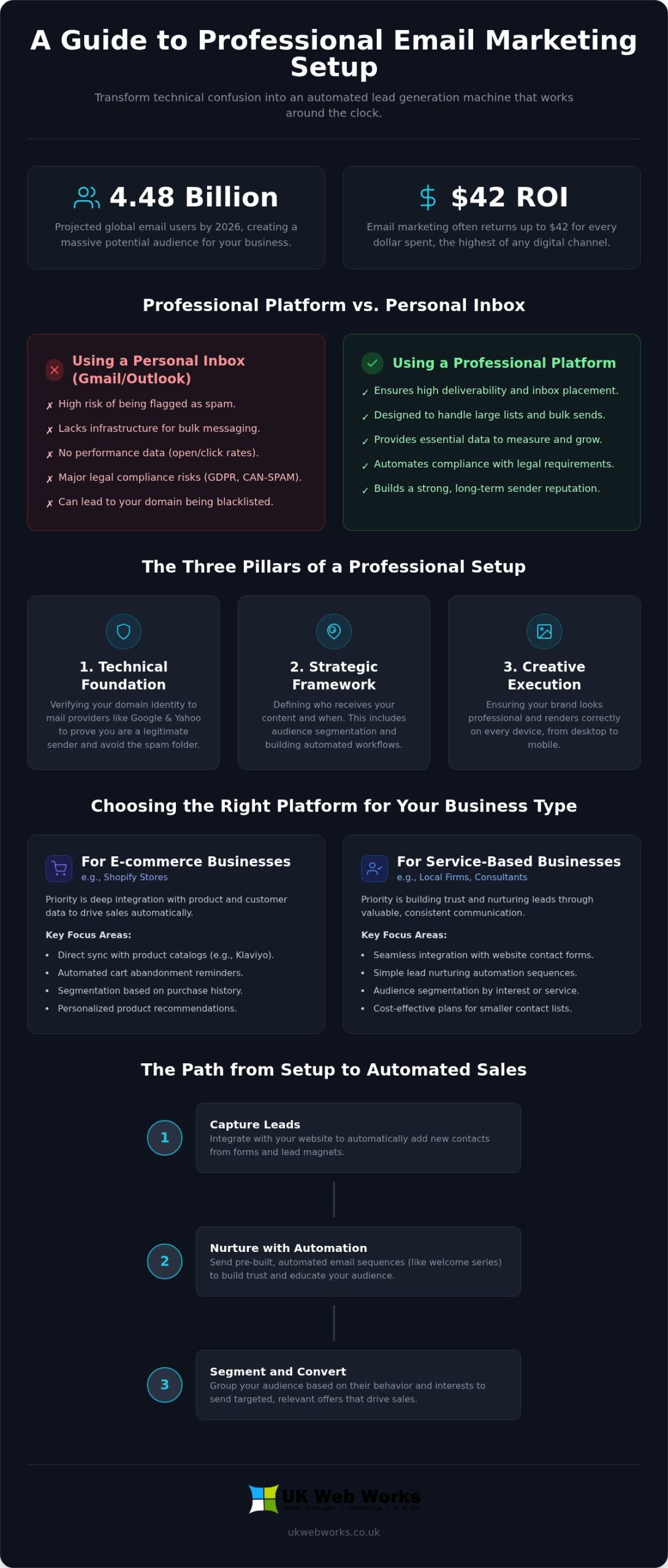
With global email users projected to reach 4.48 billion in 2026, the potential for your business is massive, often returning up to $42 for every dollar spent. However, it’s common to feel paralyzed by the dozens of software choices or the fear that a technical mistake might crash your site. You aren’t alone if you’re frustrated by low open rates or the complexity of modern deliverability rules. Getting your email marketing platform setup right is the difference between being a trusted guest in an inbox and being filtered out as noise.
We’re here to simplify this process and help you build a system that works for you, not against you. You’ll learn how to professionally configure your email marketing system to ensure high deliverability and automated sales growth. This guide provides a clear look at selecting the right tools for your list size, managing essential privacy regulations like GDPR and CAN-SPAM, and integrating your emails seamlessly with your website. We’ll show you how to move from technical confusion to a fully automated lead generation machine that works around the clock.
Key Takeaways
- Learn how to select the most cost-effective platform based on your specific website type, whether you run a Shopify store or a WordPress site.
- Understand the technical settings required to verify your domain and ensure your messages consistently reach your customers’ inboxes.
- Discover why a professional email marketing platform setup is the foundation for creating automated sales sequences that grow your business.
- Find out how to properly segment your audience so you can send relevant content that increases your open and click-through rates.
- Get a practical, jargon-free roadmap for integrating your email system with your existing website to capture and nurture leads automatically.
What is an Email Marketing Platform Setup?
Many business owners believe that starting with email marketing simply involves picking a tool and hitting “send.” In reality, a professional email marketing platform setup is a deliberate process of building a secure, reliable connection between your business and your audience. It is not just about choosing software. It is about ensuring your messages actually arrive where they are supposed to. To understand the broader context of how this fits into your digital strategy, you might first ask What is email marketing and why does it still offer the highest ROI of any digital channel? We see it as the foundation of your customer relationship management.
By 2026, the digital environment has become significantly more regulated. Major providers like Google and Yahoo have tightened their security requirements to protect users from clutter. If your system is not configured correctly, your emails will not just be ignored; they will be blocked. A proper setup rests on three essential pillars. First is the technical foundation, where we verify your identity to the world. Second is the strategic framework, which determines who receives your content and when. Third is the creative execution, ensuring your brand looks professional on every device. Neglecting these steps risks your domain being blacklisted, a technical headache that can take months to resolve.
Why You Cannot Just Use Your Personal Inbox
Using a standard Gmail or Outlook account for business broadcasts is a fast way to get flagged as a spammer. These platforms are designed for one-to-one conversations. They lack the infrastructure to handle bulk messaging or provide the data you need to grow. Beyond technical limits, you face strict legal requirements. Regulations like GDPR and PECR mandate that every marketing email includes a clear, functional “Unsubscribe” link and verifiable proof of consent. Professional platforms handle this compliance automatically. They keep you on the right side of the law while protecting your brand’s integrity.
The Business Value of a Managed Setup
A managed setup transforms your email from a manual chore into a predictable asset. Instead of sending one-off updates when you find the time, you create automated revenue streams that trigger based on how your customers behave. This consistency helps you build a strong sender reputation over time. When providers see that people regularly open your mail and do not mark it as spam, they reward you with better inbox placement. Email platform setup is the technical bridge between your brand and your customers inbox. By investing time in this initial configuration, you ensure every message you send has the best possible chance of generating a sale.
Choosing the Right Platform for Your Business
Picking the right software is about more than just a monthly price tag. Your email marketing platform setup should feel like a natural extension of your business operations, not a separate technical burden. It’s easy to get distracted by flashy features and complex dashboards you might never use. Instead, focus on how well the software talks to your existing site. Whether you use WordPress, Shopify, or a custom-built solution, the tool must integrate without breaking your workflow. You want a system that grows with you, which means looking for API flexibility and a user-friendly editor that doesn’t require a coding degree to send a simple update.
Platforms for Ecommerce vs. Service Businesses
If you run a Shopify store, deep integration is your priority. Tools like Klaviyo are popular because they sync directly with your product data. This allows you to send automated reminders when someone leaves an item in their cart without manual intervention. For service-based businesses in Hull and East Yorkshire, the focus shifts toward building trust through lead nurturing. You might not need the heavy-duty data tracking of an enterprise SaaS platform. A simpler, more direct tool often provides better value. We often see local firms paying for “Premium” tiers when a “Standard” or even “Lite” plan would handle their 500 or 1,000 contacts perfectly well.
Integration: Connecting Your Website and Email
Your email system shouldn’t live on an island. It needs to be a functional part of your bespoke website design. When a visitor fills out a contact form or downloads a lead magnet, that data should flow instantly into your marketing list. This seamless connection is what allows for a unified digital strategy. It also ensures you stay compliant with legal standards. Following a CAN-SPAM Act compliance guide is much easier when your website and email platform are properly synced from the start. Automated sign-up forms and well-placed lead magnets are the engines that drive your list growth.
Setting this up correctly from day one prevents the technical debt that ruins many marketing campaigns. If you’re feeling overwhelmed by the software options available for your email marketing platform setup, reach out to us for a straightforward chat about your specific needs. We’ll help you find a tool that fits your budget and your business goals without the jargon.
The Technical Essentials: Ensuring Deliverability
Deliverability is the invisible engine of your email strategy. You can have the most compelling offers in the world, but they mean nothing if they never reach the inbox. By 2026, major providers like Google and Yahoo have made it clear that they only trust senders who take their technical identity seriously. A professional email marketing platform setup requires a specific security handshake with these global providers to prove you are who you say you are. If you skip this step, you risk your messages being throttled or sent straight to the junk folder.
We often see businesses try to send thousands of emails immediately after opening a new account. This is a mistake. To build a solid sender reputation, you must follow warm-up protocols. This involves gradually increasing your sending volume over several weeks. It allows filters to see that real people are opening and engaging with your mail. For businesses with larger lists, we usually recommend a dedicated sending domain rather than a shared one. It gives you total control over your reputation, ensuring that other people’s bad habits don’t impact your delivery rates.
SPF, DKIM, and DMARC: A Jargon-Free Breakdown
Think of these three settings as your digital passport. They tell receiving servers that your email is legitimate and hasn’t been tampered with. We break them down like this:
- SPF (Sender Policy Framework): This is your authorised list of senders. It tells the world exactly which services have your permission to send mail on behalf of your domain.
- DKIM (DomainKeys Identified Mail): This acts as a digital signature. It proves that the email you sent is the exact same email that arrived in the customer’s inbox, with no hidden changes in between.
- DMARC (Domain-based Message Authentication, Reporting, and Conformance): These are the instructions for what to do if an email fails the first two tests. It tells providers whether to let the email through, put it in spam, or block it entirely.
Cleaning and Importing Your Data
The quality of your list is just as important as your technical settings. Buying a list is the fastest way to kill your setup. These lists are often filled with “spam traps” and dead addresses that trigger immediate red flags with providers. Before importing any existing data, we recommend scrubbing it to remove old or inactive contacts. Implementing a double opt-in process is another essential step for high-quality growth. It ensures that every person on your list actually wants to be there, which leads to higher open rates and a much healthier sender reputation in the long run.
Building Your Infrastructure: Lists and Automations
Once your technical foundation is solid, you need to build the logic that makes your system work. A common mistake during an email marketing platform setup is dumping every contact into one big list. This approach is lazy and ineffective. It prevents you from sending relevant messages to different groups of customers. Instead, you should segment your audience based on their interests, location, or purchase history. By mapping the customer journey from their first website visit to their first email sign-up, you can create a personalized experience that feels like a conversation rather than a broadcast. We also recommend setting up tracking pixels. These small pieces of code allow you to monitor ROI and see exactly which user behaviours lead to sales on your site.
The 5 Essential Automated Flows
Designing for Mobile and Accessibility
Design matters as much as data. Your templates must look great on phones, especially since a huge portion of users in Leeds and Hull check their mail on the go. High-contrast design and descriptive alt-text for images are essential for accessibility. They ensure your message is readable for everyone, regardless of the device or software they use. Always test your setup across different clients like Outlook, Apple Mail, and Gmail to ensure your layout doesn’t break. If you want a system that converts without the technical headache, let’s discuss your automation strategy today.
The UK Web Works Approach to Email Marketing
Local businesses in East Yorkshire value integrity and clear results above all else. We’ve built our reputation by providing a “Straight-Talking” approach that removes the mystery from digital growth. We don’t hide behind complex reports or confusing technical terms. Instead, we focus on the metrics that actually matter to your business: deliverability, engagement, and sales. We view email as a cornerstone of our broader digital marketing services. It’s the tool that captures the value of your website traffic and turns it into a long-term asset.
Our process is designed to be collaborative and transparent. We start by understanding your specific goals and the unique challenges of your industry. Whether you’re a local service provider or a growing ecommerce brand, we ensure your system is built to last. We provide ongoing support and maintenance to keep your technical settings updated as provider requirements change. This proactive care prevents the common issues that cause open rates to drop over time. You get the benefit of a dedicated team of specialists who are genuinely invested in your success.
Managed Setup vs. DIY
It’s tempting to try a DIY approach to save on initial costs. However, the technical debt of a poor setup is often much more expensive in the long run. If your security records are misconfigured, your domain reputation can suffer permanent damage. When we manage your email marketing platform setup, our team handles all the technical heavy lifting for you. We ensure your domain is verified, your lists are scrubbed, and your automations are logically sound. This professional configuration means you can stop worrying about technical errors and start focusing on the parts of your business you love.
Next Steps for Your Business
The best time to fix a broken email system is before your next big campaign. We suggest requesting a technical audit of your current efforts to see where you might be losing money. We often find that combining a robust email strategy with our SEO services produces the best ROI for our clients. SEO brings the right people to your door, and a professional email marketing platform setup ensures they stay there. If you’re ready to move away from guesswork and toward a system that generates results, we’re here to help. Contact UK Web Works for a jargon-free consultation and let’s discuss how we can grow your business together.
Take Control of Your Digital Growth Today
Building a reliable connection with your customers shouldn’t be a source of constant technical stress. We’ve shown that a successful email marketing platform setup relies on two main factors: solid technical security through DNS records and a logical infrastructure for your automations. When you get these right, you stop worrying about spam filters and start focusing on the revenue your messages generate. It’s about moving from manual broadcasts to a system that captures and nurtures leads automatically.
With over 10 years of experience in Hull, our team specializes in bespoke WordPress and Shopify integrations. You won’t be dealing with a distant call centre or an automated ticket system. Instead, you’ll have direct access to local experts who understand the regional market and the technical nuances of modern deliverability. We pride ourselves on a straight-talking approach that prioritizes your results over complex jargon.
Get Your Professional Email Marketing Setup Started and let’s build a reliable system that works as hard as you do. We’re ready to help you turn your email list into your most valuable business asset.
Frequently Asked Questions
How long does a professional email marketing platform setup take?
A professional email marketing platform setup typically takes between one and two weeks to complete fully. This timeframe allows us to configure your DNS settings, design your templates, and establish your initial automation logic. We also use this period to begin the domain warm-up process, which is essential for long-term deliverability. It ensures your system is stable and secure before you send your first major broadcast.
Do I need a new domain name for my email marketing?
You don’t necessarily need a new domain, but using a sub-domain is often a smart move. A sub-domain like “news.yourbusiness.co.uk” helps isolate your marketing reputation from your day-to-day business emails. This setup protects your primary inbox if a marketing campaign accidentally triggers a spam filter. It’s a standard practice for businesses that value consistent, reliable communication with their clients.
What is the best email marketing platform for a small business in 2026?
The right choice depends entirely on your specific business model and your existing website. For service-based firms in East Yorkshire, platforms like Mailchimp or HubSpot often provide the best balance of features and ease of use. If you’re running a Shopify store, a tool like Klaviyo might be better due to its deep data integration. We help you choose based on your actual needs rather than the latest marketing hype.
Can I move my existing subscribers from one platform to another?
Yes, moving your subscribers is a straightforward process of exporting and importing data. You simply download your list as a CSV file and upload it to your new platform. However, it’s vital to clean your list during this transition to remove inactive or dead addresses. This ensures your new email marketing platform setup starts with a high engagement rate and a healthy sender reputation.
Why are my emails going to the spam folder even though I have a platform?
High spam rates are usually caused by missing technical authentication or a poor sender reputation. If you haven’t correctly configured your SPF, DKIM, and DMARC records, providers like Gmail will likely flag your mail as suspicious. It could also be that your content isn’t engaging enough, leading users to mark it as spam manually. A professional audit can quickly identify which of these technical or strategic issues is causing the problem.
How much does it cost to set up an email marketing system professionally?
The cost depends on the complexity of your automations and the size of your current database. You’ll need to account for the monthly subscription fee of the platform itself and the initial time spent on technical configuration. While a DIY approach might seem cheaper at first, the cost of fixing a blacklisted domain or lost sales from poor deliverability is significantly higher. A professional setup is an investment in reliable, long-term revenue.
Is email marketing still effective with the rise of social media?
Email marketing continues to be one of the most effective ways to grow a business in 2026. Unlike social media, you own your email list and aren’t subject to changing algorithms or platform fees to reach your own audience. With an average ROI of over $36 for every $1 spent, it remains a vital tool for nurturing leads and driving repeat sales. It provides a direct, personal line to your customers that social media cannot match.
What technical skills do I need to manage the platform after setup?
You don’t need advanced technical skills to manage your system once it’s been professionally configured. We handle the complex DNS settings and automation logic during the initial build so you can focus on your message. Most modern platforms use simple drag-and-drop editors for creating content. If you can use a word processor or basic social media tools, you’ll be able to manage your daily email marketing with ease.