
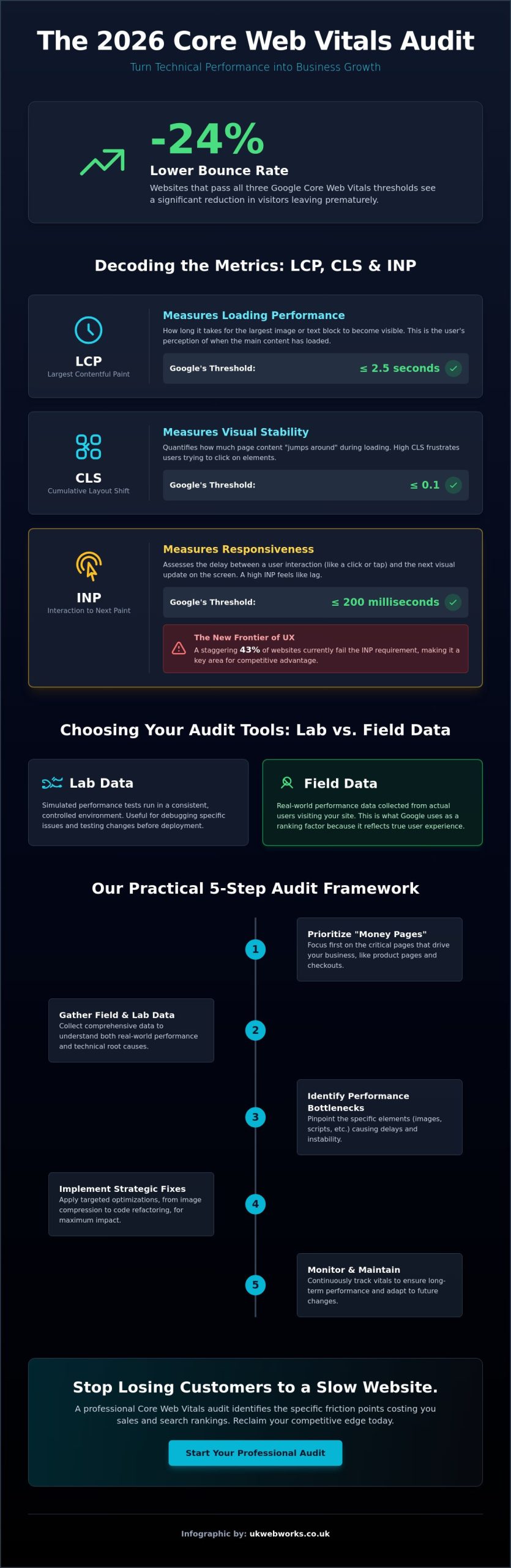
Did you know that websites passing all three Google performance thresholds see a 24% lower bounce rate on average? It’s frustrating to watch your hard-earned traffic disappear because a page takes too long to load or shifts unexpectedly while a customer is trying to buy. You’ve likely looked at those confusing technical reports and wondered if you need a specialized degree just to understand why your mobile rankings are slipping. We understand that you want a fast, stable site that works for your customers, not a list of acronyms that lead nowhere.
A professional core web vitals audit is the first step toward reclaiming your competitive edge. In this guide, we’ll help you make sense of the 2026 standards, including why 43% of websites currently fail the Interaction to Next Paint (INP) requirement. You’ll learn how to identify the specific speed and stability issues costing you money and how to fix them without breaking your budget. We’ll walk through the difference between lab tests and the real-world “field data” Google actually uses for rankings, giving you a clear list of improvements to boost your conversions and search visibility.
Key Takeaways
- Understand how the latest 2026 search standards link your site’s loading speed directly to your position in search results.
- Learn how to identify and fix specific issues like jumping buttons and slow content loading that frustrate your mobile users.
- Follow a practical five-step framework to conduct a core web vitals audit that focuses on your most important “money pages” first.
- Discover why real-world visitor data from Google is more important for your rankings than simulated lab tests.
- See how moving beyond quick fixes to high-quality responsive web development can turn technical performance into a long-term growth engine.
Understanding Core Web Vitals: Why Your Website’s Health Affects Your Bottom Line
Think of your website as a high-street storefront. If the door is heavy to open or the floor shifts under a customer’s feet, they won’t stick around to see what you’re selling. In 2026, a core web vitals audit serves as the essential speedometer for your digital user experience. It tells us exactly how fast, responsive, and stable your site feels to a real person. Google has made it clear that these metrics are a confirmed ranking factor. If your site fails to meet these standards, you’re not just fighting a technical battle; you’re actively pushing potential customers toward your faster competitors.
The Evolution of Page Experience
Google’s approach to performance has matured significantly over the last few years. They’ve moved away from simple server-speed metrics to focus on “perceived experience.” This shift recognizes that a page might technically be “loaded” while still being unusable for a human. Core Web Vitals are a set of specific metrics measuring loading, interactivity, and visual stability. Passing this audit is now a baseline requirement for competitive Search Engine Optimization (SEO). Without a healthy score, your site will struggle to appear in AI Overviews or top-tier search results, regardless of how good your content is.
The Business Impact of a Faster Site
Speed is a direct driver of revenue. Research from Digital Applied in February 2026 shows that websites passing all three Core Web Vitals thresholds enjoy a 24% lower bounce rate. When your site responds instantly, visitors stay longer and engage more deeply with your brand. This efficiency also extends to your marketing budget. For companies investing in Pay Per Click (PPC) Advertising, a fast and stable website can improve your quality score; this often leads to a lower cost per click and a better return on your investment.
The “Three-Second Rule” remains a critical benchmark for mobile users. If your main content takes longer than 2.5 seconds to appear, your conversion rates will likely drop. Visual instability is another silent killer of sales. If a “Buy Now” button jumps just as a user tries to tap it, the resulting frustration leads to abandoned carts and lost trust. A professional core web vitals audit identifies these specific friction points so you can fix them before they impact your bottom line. We focus on these practical details because we know that a faster site isn’t just about technical pride; it’s about making it easier for your customers to choose you.
Decoding the Metrics: How LCP, CLS, and INP Shape the User Journey
Google narrowed down hundreds of technical signals into three essential pillars. They call these Web Vitals. Each one targets a specific way we interact with a page. By focusing on these, a core web vitals audit cuts through the technical noise and highlights exactly where your site’s performance is failing your customers. These metrics wasn’t chosen at random; they represent the most common reasons people leave a website in frustration. They help us understand if a site is fast enough for a modern audience.
Largest Contentful Paint (LCP) and Loading
This metric tracks how long it takes for the biggest piece of content on your screen to appear. Usually, it’s a hero image or a large block of text. If this takes longer than 2.5 seconds, users feel like your site is broken. Slow hosting or unoptimised images are the most common culprits. It’s different from “First Paint,” which just shows when anything appears on the screen. LCP is about when the useful content is ready for the reader. You can identify your LCP element using the “Performance” tab in Chrome DevTools. It’s often a simple fix, such as converting a heavy JPEG to a modern format or upgrading to Managed Web Hosting.
Cumulative Layout Shift (CLS) and Visual Stability
Have you ever tried to click a link, only for the page to move and cause you to click an ad instead? That’s a layout shift. CLS measures how much elements move around while the page loads. It’s often the top cause of “accidental clicks” on mobile devices. These shifts happen when the browser doesn’t know how much space to reserve for an image or an ad before it downloads. Achieving a “zero shift” experience keeps your visitors happy and prevents the frustration that leads to abandoned shopping carts. If you’re seeing high bounce rates on mobile, speaking with a specialist about your site’s structure can often reveal simple fixes for these shifts.
Interaction to Next Paint (INP): The New Frontier
INP is the 2026 standard for measuring how snappy your site feels. It replaced the old First Input Delay metric because it tracks every interaction a user has, not just the first one. It measures the delay between a user’s action, like clicking a button, and the visual feedback on the screen. A “good” score is 200 milliseconds or less. Currently, 43% of websites fail this threshold, making it the most common stumbling block in a modern core web vitals audit. If your menu takes a second to open or a form button doesn’t look “pressed” immediately, your INP score will suffer. This metric is the most accurate way to measure if your site feels laggy to a human being.
Choosing Your Audit Tools: Lab Data vs. Field Data
You’ve likely noticed that different testing tools often give you conflicting results. One minute your site looks perfect; the next, a different report says you’re failing. This happens because there are two ways to measure performance. To get a clear picture during a core web vitals audit, we have to look at both “Lab Data” and “Field Data.” Understanding the difference is the only way to stop chasing ghost problems and start fixing what actually matters to your customers.
Lab data is a simulation. It’s like testing a car on a treadmill in a controlled garage. Tools like Lighthouse use a consistent, high-speed connection to check your site. This is great for developers because it provides immediate feedback while they’re working. However, it doesn’t account for the “weather” of the real world. Field data, on the other hand, comes from the Chrome User Experience Report (CrUX). This is the data Google collects from your actual visitors over the last 28 days. It’s the “open road” test, and it’s the data Google uses for your search rankings.
Your site might pass a lab test but fail in the real world. This often happens because your real visitors aren’t all using the latest iPhones on ultra-fast Wi-Fi. They might be on an older Android device on a patchy 4G connection. If your site is too heavy, those users will experience the lag and layout shifts that lab tests might miss. A thorough core web vitals audit must prioritise field data because that’s what your customers are actually experiencing.
Google Search Console: Your Primary Audit Dashboard
This is where Google shares the data it actually uses to rank your site. You’ll find the “Core Web Vitals” report under the “Experience” section. It uses a simple traffic light system: “Poor” (red), “Needs Improvement” (amber), and “Good” (green). We focus on this report because it highlights which specific pages are struggling. It’s the most important tool for your SEO strategy because it shows you exactly what Google sees. It’s honest, direct, and eliminates the guesswork from your performance strategy.
PageSpeed Insights and Lighthouse
PageSpeed Insights is the best tool for a quick, free health check. It’s unique because it shows you both lab and field data on a single screen. You’ll often see a big difference between your mobile and desktop scores. Mobile scores are usually lower because the tool simulates a slower processor and a weaker connection. Don’t let the “Opportunities” section give you a headache. Most of those suggestions are technical pointers for your web team. We look for the “big wins” first, such as unoptimised images or slow server response times, to get the biggest boost for the least effort.
A Practical 5-Step Framework for Your Core Web Vitals Audit
Most performance guides focus on the code first. We believe you should focus on your business goals instead. A successful core web vitals audit follows a logical path that respects your time and your budget. By following this five-step framework, you’ll move from confusing data to a faster, more profitable website without getting lost in technical minutiae. We use this exact method to ensure our clients see real-world results rather than just better looking charts.
Step 1 is identifying your “money pages.” These are the specific parts of your site that drive revenue, such as your homepage, your main service descriptions, or your WooCommerce online shop checkout. Auditing every single blog post from five years ago is often a waste of resources. Focus where your traffic is highest and your conversion potential is greatest. Once you’ve picked your targets, Step 2 involves gathering baseline field data from Google Search Console to see how real people are currently experiencing those pages.
Step 3 moves into lab testing. This is where we run controlled tests using PageSpeed Insights to find the specific technical bottlenecks. In Step 4, we triage these issues based on a simple balance: how easy is it to fix versus how much will it improve the user experience? Finally, Step 5 is implementation and validation. You apply the fixes and tell Google to re-evaluate your site. If the technical side feels overwhelming, you can always reach out for a professional site review to handle the heavy lifting for you.
Prioritising Your Fixes (Triage)
Fixing a slow LCP on your homepage is far more valuable than correcting a minor layout shift on an archived blog post. We look for “quick wins” first. Often, simple image compression or setting up Managed Web Hosting can solve the majority of loading issues. Long-term fixes, such as code minification or significant server upgrades, should be planned only after the high-impact, easy fixes are complete. This keeps your project on track and ensures your budget is spent where it matters most.
Validating the Results
After you’ve made improvements, use the “Validate Fix” button in Search Console. It’s important to remember that field data won’t update instantly. Google uses a 28-day rolling average, so you’ll need to be patient while the real-world data catches up to your technical changes. We also recommend setting up a recurring schedule through one of our Website Maintenance Plans. This prevents “performance drift,” where new images or content slowly drag your scores back down over time.
Beyond the Audit: Turning Technical Data into Business Growth
Sometimes a core web vitals audit reveals that the cracks in your site’s foundation are too deep for a quick patch. If your website is built on an old, heavy framework, you might find yourself constantly fighting against the code just to stay in Google’s “Good” range. We often see businesses spending more money on endless small fixes than they would on a fresh start. Recognising when you’ve reached the limit of your current site’s performance is a vital part of protecting your long-term revenue. To move from a reactive “fix-it” mindset to a proactive growth strategy, you can visit PurpleCow Digital Marketing for strategic development advice.
Bespoke Development vs. Off-the-Shelf Themes
Off-the-shelf themes are designed to sell to thousands of different businesses, so they’re packed with features you’ll likely never use. This “bloat” is the primary enemy of speed. Every unnecessary script and style sheet slows down your LCP and INP scores before a visitor even sees your content. Custom-coded websites are different. They are built for speed from the very first line of code. Choosing bespoke web design is the ultimate solution for long-term performance. You get a lean, efficient structure that is tailored specifically to your business needs, ensuring you don’t fail future audits because of hidden baggage.
Partnering for Performance
Performance isn’t a “set and forget” task. Every time you upload a new high-resolution image or add a third-party plugin, you risk dragging your scores back down. Many of our clients prefer to outsource the technical monitoring so they can focus on running their business. A website maintenance package provides the constant monitoring required to prevent performance drift. We keep a close eye on your vitals so that your site remains as fast as the day it launched.
A core web vitals audit is more than just a technical checklist; it’s a commitment to your customers’ experience. When these technical improvements are combined with our SEO agency services, your performance data becomes a powerful tool for driving more traffic. By prioritising speed and stability today, you’re building a reliable platform that will support your business growth for years to come. We’re here to help you turn those technical reports into a faster, more profitable online presence.
Future-Proof Your Business with Better Site Performance
Performance standards in 2026 are higher than ever, but they don’t have to be confusing. By focusing on real-world field data and prioritising your most important pages, you can turn technical metrics into a genuine competitive advantage. We’ve seen how a thorough core web vitals audit reveals the hidden friction points that cause your visitors to bounce. Whether the issue is an unoptimised image or a bloated theme, these challenges are fixable with the right approach.
Our team provides no-nonsense, jargon-free consulting and bespoke performance-first development. We have a proven track record of improving site speed and helping businesses reclaim their search rankings. Get a jargon-free Core Web Vitals audit from our experts today. You’ve worked hard to grow your presence online; don’t let technical instability hold you back. We’re ready to help you build a faster, more reliable future for your brand.
Frequently Asked Questions
How long does a Core Web Vitals audit take to complete?
A standard audit typically takes between three to seven working days to complete for most small to medium-sized business websites. This timeframe allows us to gather enough real-world field data and run comprehensive lab tests on your primary “money pages.” While automated tools give instant scores, a manual review is necessary to understand the “why” behind the numbers and create a practical roadmap for improvement.
Do Core Web Vitals affect my Google Ads (PPC) performance?
Your performance scores directly influence your landing page experience, which is a key component of your Google Ads Quality Score. When your site is slow or unstable, Google may increase your cost per click or lower your ad’s position. Investing in Pay Per Click (PPC) Advertising is much more effective when your website loads quickly and provides a smooth experience for the traffic you’ve paid to acquire.
My site scores 100/100 on desktop but fails on mobile—why?
Mobile scores are usually lower because Google simulates a slower processor and a throttled 4G connection during the test. Desktop computers have more power and faster internet, which can hide inefficient code that a mobile device struggles to process. Since most web traffic now comes from handheld devices, we prioritise mobile performance in every core web vitals audit to ensure you aren’t losing customers on the go.
Can I pass Core Web Vitals if I use a website builder like Wix or Squarespace?
You can pass these checks on a website builder, but it is often more difficult because you don’t have control over the platform’s underlying code. These builders often load heavy scripts that you can’t remove, which can drag down your scores. If you find your current builder is holding you back, moving to a Bespoke Website Design or WordPress CMS Development can give you the technical control needed for better performance.
What is the most common reason for a failing CLS score?
Images and videos without defined width and height attributes are the most frequent causes of a poor Cumulative Layout Shift (CLS) score. When the browser doesn’t know how much space to reserve for an image, it has to move the rest of the content once the file finally downloads. Adding simple dimensions to your media and reserving space for late-loading advertisements can often fix these frustrating visual jumps instantly.
How much does it cost to fix Core Web Vitals issues?
Do I need to be a developer to run a Core Web Vitals audit?
You don’t need to be a developer to run a basic core web vitals audit using free tools like Google Search Console or PageSpeed Insights. These reports are designed to be accessible to business owners and provide a clear starting point. However, interpreting the technical suggestions and safely implementing code changes usually requires a professional touch. We recommend running the reports yourself first to see where you stand before seeking expert help for the fixes.
Will passing Core Web Vitals automatically put me at the top of Google?
Passing these metrics is a confirmed ranking factor, but it isn’t a “silver bullet” that guarantees the top spot. Google still prioritises high-quality content and relevance above all else. Think of performance as a tie-breaker; if two sites have equally good content, Google will almost always rank the faster, more stable site higher. It’s a baseline requirement for modern Search Engine Optimization (SEO) in a competitive market.