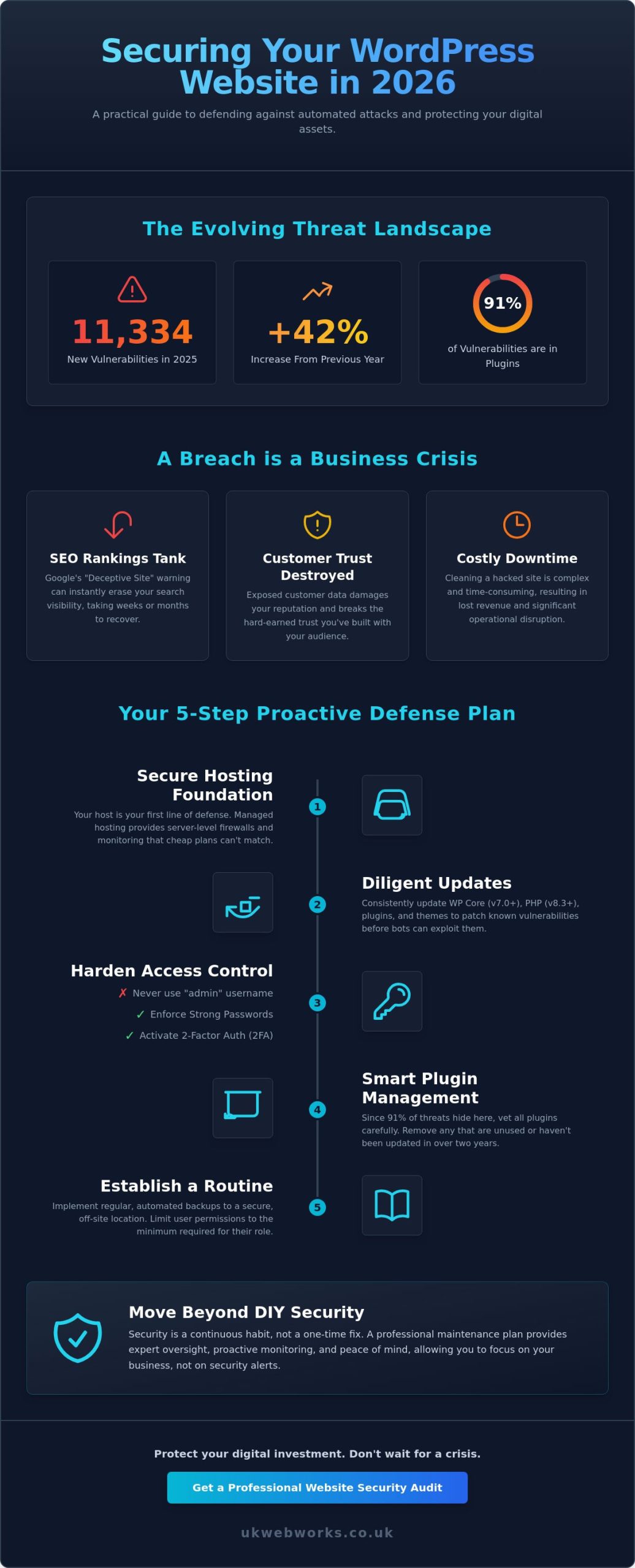
Did you know that 11,334 new WordPress vulnerabilities were disclosed in 2025? This represents a 42% increase from the previous year, with 91% of those issues hiding in plugins rather than the core software. If these numbers make you feel uneasy, you aren’t alone. Most business owners feel overwhelmed by technical jargon and the constant pressure to keep their data safe. You want a secure site, but you don’t have hours to spend decoding complex security manuals or worrying about the latest hacker trends.
We understand that your time is valuable and your focus should stay on your customers. This guide cuts through the noise to show you exactly how to secure a wordpress website in 2026 without the headache. We will walk you through the essential settings for the new WordPress 7.0 release, explain why PHP 8.3 is your new best friend, and help you establish a clear maintenance routine. By the end of this article, you will have a practical plan to protect your business and the peace of mind that comes with a professional, proactive defense.
Key Takeaways
- Understand why security is a continuous habit rather than a one-time task to keep automated bots at bay.
- Learn how to secure a wordpress website by mastering the essentials of core updates, strong authentication, and removing the default ‘Admin’ username.
- Discover why your choice of web host is your most critical security decision and how managed environments offer a layer of protection cheap hosting can’t match.
- Implement a no-nonsense backup strategy and learn how to limit user access to protect your business data from internal and external threats.
- Explore the benefits of professional oversight and why a dedicated maintenance plan provides better security than relying on plugins alone.
Why WordPress Security is a Continuous Process, Not a One-Off Task
Many people think that once they’ve installed a security plugin, the job is done. It isn’t. Security isn’t about reaching a finish line; it’s about staying ahead of a moving target. We view it as an ongoing strategy to reduce risk rather than a way to eliminate it entirely. In the 2026 environment, this mindset is more important than ever. With 11,334 new vulnerabilities disclosed in 2025, the volume of threats is rising. Since 91% of these issues hide in plugins, your site needs a layered defense. This approach starts with secure hosting, moves through the core software, and relies on your daily habits. Understanding how to secure a wordpress website effectively means accepting that your site is a living digital asset that needs regular care.
The Reality of Automated Attacks
Hackers don’t sit at their desks manually typing into your login page. They use automated bots. These scripts scan thousands of sites every minute, looking for a specific door left ajar. They don’t care if you’re a local bakery or a global corporation. If you have a known weakness in an outdated plugin, they will find it. This is why “security through obscurity,” like simply hiding your login page, isn’t a real solution. Bots are smarter than that. Instead, you need a “hardened” site. This means creating multiple hurdles that make your website a less attractive target. You can find a good overview of standard WordPress security features to see what the platform offers out of the box and where you need to add your own layers.
What Happens When a Site is Compromised?
A breach isn’t just a technical glitch. It’s a business crisis. If Google detects malware, it will flag your site with a “Deceptive Site” warning. This tanks your SEO rankings instantly and can take weeks to recover. Even worse, your customer data could be exposed. This destroys the trust you’ve worked hard to build. We believe that security should be baked into your site from day one. This is why choosing bespoke web design is so valuable. It allows you to build a foundation that prioritizes clean code and professional standards from the start. When your site is built correctly, it’s naturally more resistant to attacks, making your ongoing maintenance much simpler and more effective.
Securing the Core: Updates, Passwords, and Two-Factor Authentication
Protecting the core of your site is about locking the front door effectively. With WordPress 7.0 now officially released as of May 20, 2026, it’s the perfect time to audit your settings. Many people ask how to secure a wordpress website, and the answer almost always begins with updates. Each update often contains patches for bugs that hackers are already trying to exploit. If you ignore that “Update Available” notification, you’re essentially leaving your business keys in the lock. This is particularly vital given that even popular tools, such as the Avada Builder plugin, faced high-severity SQL Injection vulnerabilities as recently as May 2026.
Next, you should look at your username. If it’s still “Admin,” change it immediately. Since bots know “Admin” is the default, you’ve already given them half the information they need to break in. Create a new user with administrator privileges, give it a unique name, and delete the original one. Combining a unique username with a password manager for your team ensures that everyone uses strong, unguessable credentials without the risk of forgetting them.
The Update Routine: Best Practices
Always run a full backup before you update anything. Sometimes new software clashes with your existing setup, and you need a way to hit “undo” quickly. Be especially wary of abandoned plugins. If a developer hasn’t touched a plugin in two years, it likely won’t be compatible with modern requirements like PHP 8.3. This is a common area where our website maintenance packages provide value. We handle the testing and deployment so you don’t have to worry about a broken site after a patch.
Hardening Your Login Credentials
Understanding how to secure a wordpress website also requires looking at how you log in. Two-Factor Authentication (2FA) is now a non-negotiable standard. By using an app like Google Authenticator or Authy, you ensure that even if a hacker steals your password, they still can’t get in. You should also consult a professional WordPress security checklist to see how your current setup compares to industry standards. We also recommend limiting login attempts to prevent “brute force” attacks, where bots try thousands of passwords in seconds. Instead of a complex but short password, try a long passphrase. Four random words are much harder for a computer to guess but easier for you to remember. If you want to ensure your site stays protected without the daily stress, consider one of our Website Maintenance Plans to keep your credentials and core software in top shape.
The Role of Managed Hosting and Smart Plugin Management
Your choice of web host is the single most important security decision you’ll make. Think of your hosting provider as the foundation of your house. If the foundation is weak, it doesn’t matter how many locks you put on the front door. When considering how to secure a wordpress website, many people overlook the server itself. Cheap shared hosting often places your site on the same server as thousands of others. If one of those sites is compromised, yours could be at risk too. In contrast, a professional Managed Web Hosting environment is built specifically for WordPress. These environments include server-level firewalls and malware scanning as a standard first line of defence, stopping threats before they even reach your dashboard.
The second part of this foundation is how you manage your plugins. Every active plugin increases your “attack surface,” which is just a fancy way of saying it’s another potential entry point for a hacker. A “less is more” approach is always best. If a plugin doesn’t provide a vital function for your business, you’re better off without it. By keeping your setup lean, you reduce the number of things that can go wrong or require updates.
What to Look for in a Secure Host
You don’t need to be a systems administrator to pick a good host, but you should look for these three essentials:
- Free SSL Certificates: This ensures your site uses HTTPS, encrypting the data sent between your visitors and your server.
- Automated Daily Backups: A secure host should back up your site every day and store those files on a different server so you can recover quickly if something goes wrong.
- Web Application Firewall (WAF): This server-side tool identifies and blocks malicious traffic, such as bots trying to guess your passwords.
Auditing Your Plugin Library
Learning how to secure a wordpress website also involves a bit of spring cleaning. You should only use reputable plugins with high numbers of active installations and positive, recent reviews. Avoid “nulled” or pirated versions of premium plugins at all costs; these are almost always injected with malicious code that gives hackers a “backdoor” into your site. If you stop using a plugin or a theme, don’t just deactivate it. You must delete it entirely. Even a deactivated plugin can contain vulnerabilities that a clever script can exploit. If you find this technical upkeep a bit daunting, our Website Maintenance Plans include regular audits to ensure your plugin library stays safe, lean, and fully updated to support modern standards like PHP 8.3.
Establishing a Proactive Defence: Backups and User Access Control
A proactive defence is your business safety net. No matter how many walls you build, you must have a plan for the “what if” scenario. When we talk about how to secure a wordpress website, we aren’t just talking about blocking attacks. We’re talking about ensuring that if the worst happens, your business data remains safe and recoverable. This starts with a robust backup strategy and tight control over who can touch your site’s settings. You don’t need to be a developer to implement these steps, but you do need to be consistent.
The 3-2-1 Backup Rule for Websites
We recommend the 3-2-1 rule for every business owner. This means having three copies of your data, stored on two different types of media, with one copy kept entirely off-site. Storing your backups on the same server as your website is a significant risk. If that server is compromised or suffers a hardware failure, you lose both your live site and your only way to restore it. Use automated tools that send your data to a secure, independent cloud storage provider. This ensures that even in a total server meltdown, your business can be back online in hours, not days.
Managing User Roles and Permissions
The “Principle of Least Privilege” is a simple rule: only give people the access they absolutely need. WordPress has built-in roles like Administrator, Editor, and Contributor for a reason. If a staff member only needs to post blog updates, they should be an Editor, not an Administrator. Applying these permission levels is a core part of how to secure a wordpress website against internal mistakes or stolen credentials. This limits the damage that can be done if a single account is ever compromised.
You should also perform regular audits of your user list. It’s easy to forget about a former employee or a one-off contractor who still has an active login. Remove these accounts immediately once their work is finished. We also strongly advise against sharing a single login between multiple staff members. Shared accounts make it impossible to track changes and create a massive security hole. If you want to ensure your site is always protected by professional oversight, our Website Maintenance Plans take the guesswork out of user management and backup scheduling.
Finally, ensure your SSL certificate is always active to encrypt data between your visitors and the server. This is vital for protecting customer information. Combine this with file change monitoring, which acts like a silent alarm. It lets you know the moment a core file is modified without your knowledge. These layers create a resilient environment that protects both your reputation and your business data.
Moving Beyond DIY: The Value of Managed Website Maintenance
We view security as a direct investment in your brand identity and long-term customer trust. Your website is often the first point of contact for new clients. If they encounter a “Deceptive Site” warning or a broken layout caused by a faulty update, it reflects poorly on your professionalism. Maintaining a secure environment isn’t just about stopping hackers; it’s about protecting the reputation you’ve worked hard to build.
The Cost of a Breach vs. The Cost of Maintenance
The financial impact of a hacked site goes far beyond the immediate technical fix. When a breach occurs, you’re often hit with emergency developer fees for cleanup, lost sales while your site is offline, and a significant drop in SEO rankings that can take months to recover. It’s far more cost-effective to invest in a proactive Website Maintenance Plan than to deal with the fallout of a crisis. Having professional support provides a safety net, giving you the peace of mind that experts are monitoring your digital assets while you focus on running your business.
How UK Web Works Protects Your Business
We provide a grounded, jargon-free approach to technical security. Our team understands that you need solutions that work without requiring you to become a security expert yourself. We handle the heavy lifting, including proactive software updates, regular security audits, and high-quality Managed Web Hosting. By combining the latest automated scanning with our hands-on expertise, we ensure your site stays ahead of the threats disclosed in the 2026 landscape. We don’t just fix problems; we prevent them from happening in the first place.
You don’t have to manage these complex digital challenges alone. Our goal is to act as a reliable partner, ensuring your WordPress site remains a secure and powerful tool for your business. Speak to our team about securing your WordPress site today and let us help you establish a clear, professional maintenance routine that lasts.
Take Control of Your Website Security Today
Establishing a secure online presence doesn’t have to be a source of stress. We’ve explored how a layered approach, from choosing managed hosting to perfecting your update routine, creates a resilient foundation for your business. Security is a continuous process that relies on proactive habits and professional oversight rather than a single plugin. By mastering how to secure a wordpress website, you protect your customer data and ensure your brand remains a trusted choice in the 2026 digital market.
We specialize in helping businesses simplify their technical needs. Our team of managed WordPress hosting specialists provides jargon-free expert support and proactive 24/7 security monitoring to keep your site running smoothly. You don’t have to worry about the technical details when you have a reliable partner in your corner. Protect your digital investment with our professional website maintenance packages and gain the peace of mind you deserve. Your website is a valuable asset; let’s work together to keep it that way.
Frequently Asked Questions
Is WordPress inherently insecure?
No, WordPress is a robust and well-maintained platform. Most security issues occur when site owners neglect core updates or use poorly coded third-party plugins. By following professional advice on how to secure a wordpress website, you can make the platform extremely safe. It’s about how you manage the software rather than a flaw in the software itself.
Do I really need a security plugin if I have a small website?
Yes, every site needs protection regardless of its size. Automated bots scan millions of websites daily looking for easy targets to use for spam or phishing campaigns. A security plugin acts as a vital early warning system. It helps block these automated attempts before they can do any damage to your business reputation or data.
What is the best way to back up my WordPress site in 2026?
The best method is an automated, off-site system that follows the 3-2-1 rule. You should never store your backup files on the same server as your website. If the server fails, you lose both the site and the backup. Instead, use a tool that sends your data to an independent cloud service to ensure you always have a clean copy ready.
How often should I check my website for security issues?
You should have automated tools checking your site every day for malware and unauthorized file changes. On a manual level, we recommend a quick review of your dashboard once a week. This allows you to check for pending updates and ensure your user list remains accurate. Regular oversight is a key part of how to secure a wordpress website effectively.
Can a free SSL certificate really protect my website?
Yes, a free SSL certificate provides the same level of encryption as most paid versions. It’s now a standard requirement for any professional site. It protects the data traveling between your visitors’ browsers and your server. While some paid certificates offer extra validation levels, a free one is perfectly sufficient for encrypting contact forms and login credentials for most businesses.
What should I do if I think my WordPress site has been hacked?
Take your site offline immediately to prevent further damage to your reputation or visitors. Your first step should be to change all administrative passwords and your hosting account credentials. If you have a clean, off-site backup, you can restore your site to a point before the breach. If you aren’t sure how to proceed, contact a professional to perform a deep clean.
Does managed hosting include website security?
Managed hosting typically includes server-level security features like firewalls and automated malware scanning. This provides a much safer environment than cheap shared hosting. However, you are still responsible for your specific WordPress settings and plugin updates. Combining managed hosting with a professional maintenance plan ensures that both the server and your actual website remain fully protected.
Why is two-factor authentication so important for WordPress?
Two-factor authentication (2FA) adds a vital second lock to your login page. Even if a hacker manages to steal your password through a data breach elsewhere, they still can’t access your dashboard without the unique code from your mobile device. It’s one of the most effective ways to stop unauthorized access and protect your sensitive business data from being compromised.