
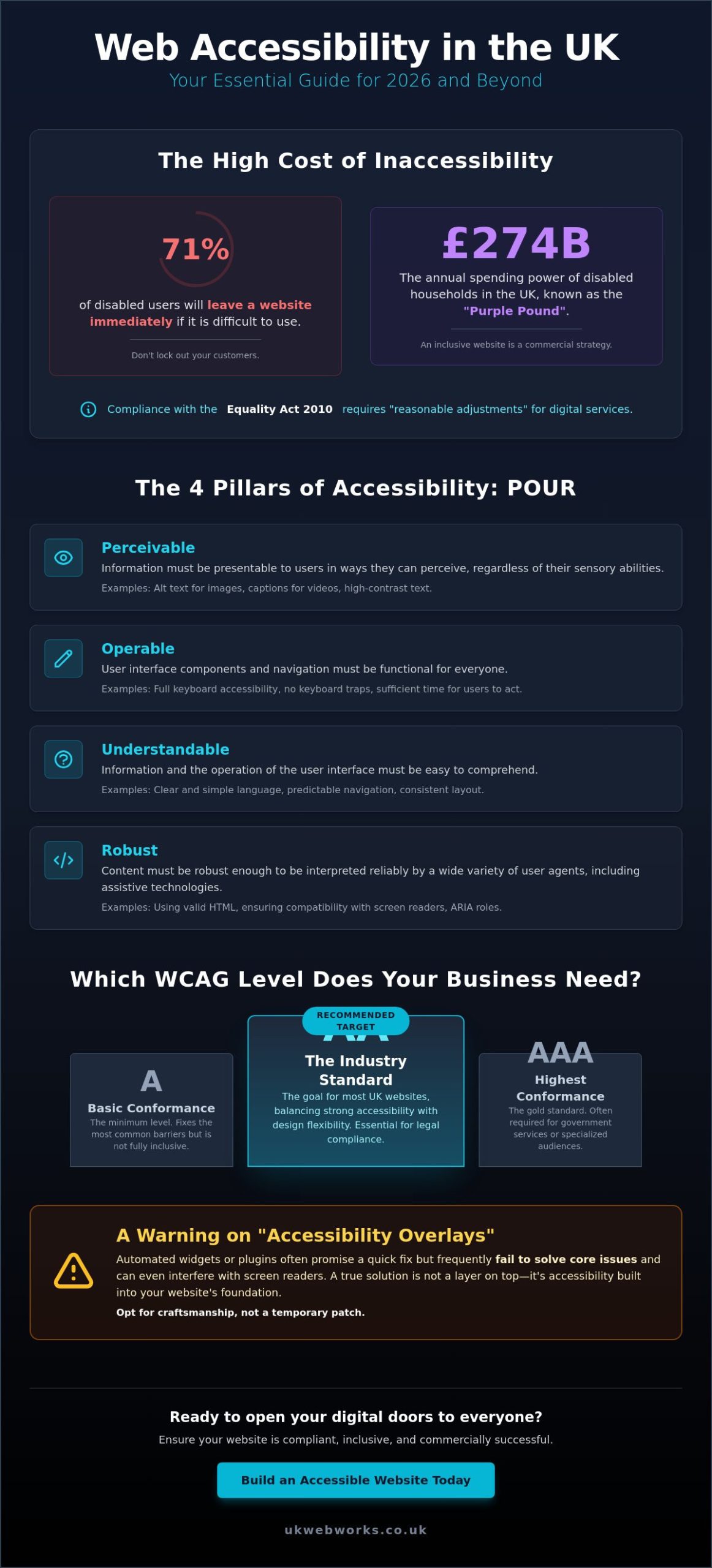
Did you know that 71% of consumers with a disability will leave your website immediately if they find it difficult to use? In the UK alone, this “purple pound” represents a spending power of £274 billion per year, yet many businesses are still unintentionally locking these customers out. Mastering accessibility in web design (wcag) uk isn’t just about ticking a legal box. It’s about making sure your digital shop front is open to everyone who wants to do business with you.
You might feel overwhelmed by the technical shift from WCAG 2.1 to 2.2, or perhaps you’re worried that strict compliance will ruin your site’s aesthetic. We understand those concerns, but we’ve found that the best designs are often the most inclusive ones. This guide provides a practical, jargon-free checklist to help you navigate the 2026 standards with confidence. We’ll show you how to meet your obligations under the Equality Act 2010 while also boosting your commercial success through high-quality, responsive web development. From understanding the ROI of inclusive design to technical fixes, we have you covered.
Key Takeaways
- Understand the shift to WCAG 2.2 and why these updated standards are now the essential benchmark for any UK business operating online.
- Learn how to apply the four POUR principles to your site, ensuring your content remains perceivable and operable for every visitor.
- Discover why Level AA is the recommended target for accessibility in web design (wcag) uk to balance legal compliance with a great user experience.
- Access a practical audit checklist that helps you identify and fix high-impact issues while naturally boosting your site’s SEO performance.
- Find out why automated “accessibility overlays” often fail screen reader users and why a built-in, craftsmanship-focused approach is the only reliable fix.
What is WCAG and Why Does It Matter for UK Websites in 2026?
The Web Content Accessibility Guidelines (WCAG) serve as the global rulebook for digital inclusion. Think of these guidelines as a set of technical instructions that ensure your website works for everyone, regardless of how they browse the internet. By 2026, the standard has firmly shifted from version 2.1 to WCAG 2.2. This update introduced nine new criteria specifically designed to help users with cognitive disabilities and those using mobile devices. For UK brands, staying current with these updates is no longer optional; it is a requirement for maintaining a professional digital presence.
A common misconception is that accessibility only helps people with permanent disabilities, such as total blindness or profound hearing loss. In reality, inclusive design helps almost everyone at some point. You’ve likely benefited from it yourself. Perhaps you have watched a video with captions in a noisy train station or navigated a site using only a keyboard when your trackpad stopped working. High-quality accessibility in web design (wcag) uk creates a better experience for the person using a smartphone in bright sunlight or the busy professional browsing with one hand. It makes your site more resilient and user-friendly for the entire population.
There is also a significant technical advantage to following these rules. Search engines like Google use automated bots to “read” and understand your website. When we prioritize Responsive Web Development that follows accessibility standards, we provide these bots with a clean, logical map of your content. Using semantic HTML and descriptive alt text directly supports your Search Engine Optimization (SEO) efforts. It makes your site easier to crawl, which can lead to better visibility in search results.
The Legal Landscape: The Equality Act 2010
The Equality Act 2010 requires UK service providers to make “reasonable adjustments” so that disabled people can access their goods and services. This legislation applies to your digital presence just as much as it does to a brick-and-mortar shop. While the Public Sector Bodies Accessibility Regulations 2018 set strict mandates for government sites, private businesses are not exempt from their moral and legal obligations. Even small private companies can face legal challenges or reputation damage if their websites are found to be discriminatory or fundamentally unusable for people with disabilities.
The Business Case: Tapping into the Purple Pound
Ignoring accessibility means turning away a massive segment of the UK market. The “Purple Pound” refers to the combined spending power of disabled households in the UK, which is estimated to be around £274 billion per year as of 2026. If your website is difficult to navigate, 71% of these users will simply leave and take their custom elsewhere. By choosing to build inclusive Shopify Ecommerce Stores or WooCommerce Online Shops, you are opening your doors to a wider audience. It is a practical commercial strategy that reduces bounce rates and improves conversion for every visitor.
The Four Pillars of Web Accessibility: POUR Explained
To build a truly inclusive site, you need a solid framework. The industry uses the acronym POUR. It stands for Perceivable, Operable, Understandable, and Robust. These four pillars are the bedrock of accessibility in web design (wcag) uk. They aren’t tied to a specific piece of software or a single device. Instead, they focus on the human experience. Whether a customer is using a voice assistant, a screen reader, or a standard laptop, these principles ensure your message gets through clearly. This logic is central to the UK Government Accessibility Requirements, which provide a reliable benchmark for any business looking to expand its reach in 2026.
Perceivable and Operable: Seeing and Doing
Perceivable means users shouldn’t be “blind” to your content because of the way it’s presented. If you have an image, a screen reader needs a text description to explain it. If you have a video, a person with a hearing impairment needs captions to follow along. It’s about ensuring information is presented in a way that can be processed by different senses. Operable is about the “doing” part of the web. Can a visitor navigate your site without a mouse? Many modern websites fail here because their “hidden” navigation menus on mobile devices are impossible to trigger with a keyboard. When we craft bespoke web design hull, we prioritize these interactive elements. We make sure every button and link is easy to find and use, no matter the device.
Understandable and Robust: Logic and Longevity
Understandable content is predictable. Your navigation shouldn’t change its layout from one page to the next. Your contact forms should offer clear, jargon-free error messages that tell a user exactly how to fix a mistake. If someone enters an invalid phone number, the site should help them, not leave them guessing. Robustness is the final piece of the puzzle. It’s about future-proofing. A robust site is built with clean, high-quality code that doesn’t break when a browser updates or a new assistive tool is released. Technology moves fast, and your digital investment needs to keep up. We find that our website maintenance packages are the best way to ensure this long-term technical health. Regular updates keep your site compliant as WCAG standards evolve.
If you’re unsure where your current site stands against these pillars, get in touch with our team for a straightforward conversation about your options. We can help you identify the quick wins that make a massive difference to your users.
A vs AA vs AAA: Which Level Does Your Business Need?
When you look at the Official WCAG 2.2 Guidelines, you will see the requirements divided into three levels: A, AA, and AAA. It’s easiest to think of this as a “good, better, best” hierarchy. For most UK businesses, the goal isn’t just to do the bare minimum, but to find a balance between high-quality design and full inclusivity. While Level AAA is the highest possible standard, it’s often intended for specialized sites, like government portals or educational resources. Attempting to reach AAA on every single page of a commercial website can actually be counter-productive. It can restrict your design choices so much that the user experience suffers for the majority of your visitors.
For private SMEs, the sweet spot is almost always Level AA. This is the industry standard for accessibility in web design (wcag) uk. It provides a robust level of protection under the Equality Act 2010 without forcing you to compromise on a modern, visually engaging brand identity. Achieving Level AA also has a direct, positive impact on your visibility. Search engines reward sites that are easy to navigate and logically structured. This is why our work as a SEO agency hull always starts with these accessibility foundations. If the bots can’t read your site effectively, your rankings will struggle.
Level A: The Bare Minimum
Level A covers the most basic requirements. It ensures there are no “keyboard traps” where a user gets stuck in a menu, and it requires basic captions for pre-recorded video. While it’s a start, Level A is generally considered insufficient for legal protection in the UK. It misses critical elements like color contrast and text resizing, which are vital for users with visual impairments. Treating Level A as your final goal is a bit like putting a lock on your front door but leaving all the windows open. It simply doesn’t offer enough coverage for a professional business.
Level AA: The Commercial Sweet Spot
Level AA is where we focus our efforts during bespoke builds. This level introduces stricter rules for color contrast ratios, ensuring your text is readable against its background. It also requires that users can resize text up to 200% without the page breaking. These features don’t just help disabled users; they significantly improve mobile usability for everyone. When a customer is browsing your site on a phone in a bright environment, that extra contrast and flexible layout make their life much easier. Level AA ensures your site is functional, professional, and legally sound.
The 2026 Essential Web Accessibility Checklist
Now that you understand the different levels of compliance, it’s time to look at your own site. Auditing for accessibility in web design (wcag) uk doesn’t have to be a technical headache. We recommend a logical flow that moves from the visual elements your customers see to the underlying structure that powers the experience. By prioritizing these high-impact changes, you aren’t just helping users with disabilities. You’re also making your site significantly easier for search engines to index and rank. Every item on this list serves a dual purpose: better inclusion and better performance.
Visual and Content Checklist
Your visual choices are the first thing a visitor notices. Before you even think about code, look at your colours. As a brand identity agency, we always advise starting with an accessible palette. Use a contrast checker to ensure your text doesn’t blend into the background. A simple “non-techie” test is to view your site in greyscale; if you can’t read the text easily, your contrast is too low. Next, check your images. Every meaningful picture needs descriptive alt-text. Don’t just stuff it with keywords. Write a short, honest sentence describing the image for someone who can’t see it. Finally, look at your headings. Ensure you use H1 through H6 in a logical order. This hierarchy acts as a map for screen readers and helps Google understand the relationship between your topics.
Structural and Functional Checklist
A site that looks good but doesn’t work is a major barrier. Start with a keyboard test. Put your mouse aside and try to navigate your entire homepage using only the “Tab” and “Enter” keys. If you get stuck or can’t see which button is highlighted, your site has a structural flaw. You should also pay close attention to your contact forms. Every field needs a clear, permanent label. Don’t rely on “placeholder” text that disappears when a user starts typing, as this confuses both humans and assistive tools. Another common pitfall is using vague links like “click here” or “read more.” Instead, use descriptive, keyword-rich text such as “view our responsive web development services.” This tells the user exactly where the link leads and provides much better context for search engine bots crawling your pages.
If this checklist has highlighted gaps in your current site, don’t worry. Most issues can be fixed with a methodical approach to maintenance. If you want a professional eye to review your site and provide a clear path forward, book an accessibility audit with our team today. We can help you turn these requirements into a commercial advantage.
Implementing Accessibility: Why “Overlays” are Not the Answer
In the rush to meet legal standards, you might have seen adverts for “accessibility overlays.” These are small widgets that promise to make your site compliant with just one line of code. It sounds like a perfect, low-cost solution, but the reality is quite different. For many users, these overlays act as a barrier rather than a bridge. They often interfere with the custom settings a disabled person already has on their computer. Instead of fixing the site, they layer a new, often broken interface on top of it. Relying on these tools for accessibility in web design (wcag) uk is a risk that can lead to the very legal and commercial issues you’re trying to avoid.
Screen reader users frequently report that these widgets make a site unusable. The software they rely on is highly sophisticated. When an overlay tries to take control, it can create “keyboard traps” or read out confusing, automated descriptions of images. True inclusion can’t be automated with a script. It requires a commitment to clean, valid code that follows the WCAG 2.2 AA standards from the very first line of development. A sticking plaster won’t fix a fundamental structural problem.
The Craftsmanship of Accessible Code
This is why choosing the right ecommerce web design company matters so much. We don’t believe in shortcuts that compromise the user experience. We build accessibility into the foundation of every project, from the site architecture to the final checkout button. We also believe in testing with real people. Automated tools are a helpful start, but they can’t tell you if a site actually feels intuitive to use. Our jargon-free approach means we’ll explain the logic behind every technical choice. You’ll feel confident in your site’s long-term compliance without needing a degree in computer science to understand it.
Next Steps for Your Business
If you’re based in Hull, York, or Leeds, you don’t have to tackle this alone. We provide local accessibility audits that give you a clear, honest picture of where your site stands. We’ll show you exactly what needs to change and how to do it without ruining your brand’s aesthetic. A site that everyone can use is a site that performs better for everyone. It’s a sign of a high-quality, professional business that values its customers. Let’s build something better together. Contact our team to start your journey toward a more inclusive and successful digital presence.
Future-Proof Your Digital Presence for 2026 and Beyond
Web accessibility is no longer a niche technical requirement. It is a fundamental part of building a successful, inclusive brand. We have explored why WCAG 2.2 Level AA is the essential benchmark for UK businesses and why automated “quick-fix” overlays simply don’t work. By focusing on clean, bespoke code and the four POUR principles, you protect your business legally while opening your doors to a wider audience. High-quality design and full inclusivity go hand in hand.
Mastering accessibility in web design (wcag) uk doesn’t have to be a solo struggle. Our team brings over 10 years of technical expertise to every project, ensuring your site remains robust and compliant. We specialize in bespoke WCAG 2.2 compliant designs that look fantastic and function perfectly for everyone. Based right here in Yorkshire, we provide the local, direct support you need to simplify complex digital standards and focus on growing your business.
Ready to see where your site stands? Get a Jargon-Free Accessibility Audit for Your UK Business today. We’ll provide a clear, honest assessment and a practical path forward. Let’s make the web a more inclusive place, one high-quality website at a time.
Frequently Asked Questions
Is web accessibility a legal requirement for UK businesses?
Yes, the Equality Act 2010 requires all UK service providers to make reasonable adjustments so that disabled people can access their goods and services. This includes your digital presence. While public sector bodies follow specific 2018 regulations, private companies must also ensure their websites don’t discriminate against users with impairments. Failing to do so can leave your business open to legal challenges and reputational damage.
What is the difference between WCAG 2.1 and WCAG 2.2?
WCAG 2.2 is the latest version of the guidelines, building upon the foundations of 2.1 by adding nine new success criteria. These updates focus heavily on improving the experience for users with cognitive disabilities and those browsing on mobile devices. If you want to maintain high standards for accessibility in web design (wcag) uk, moving toward version 2.2 is the most reliable way to future-proof your site.
How much does it cost to make a website accessible in the UK?
The cost of accessibility depends entirely on the size of your website and the current state of your code. Building accessibility into a new project from the start is much more efficient than trying to retrofit an older, complex site. We recommend starting with an audit to identify specific gaps. This allows you to prioritize high-impact changes that fit your budget while steadily improving your site’s inclusivity.
Can I use an automated plugin to fix my website accessibility?
No, automated plugins or “overlays” are not a reliable way to achieve true compliance. These tools often fail to fix underlying structural issues and can actually make navigation harder for people using screen readers. Real accessibility requires a craftsmanship-focused approach to your code. A manual review and clean development are the only ways to ensure your site works correctly for every visitor.
Does web accessibility help with my Google SEO rankings?
Improving accessibility in web design (wcag) uk has a direct, positive impact on your search engine performance. Google’s bots crawl your site in a similar way to assistive technologies, looking for clear headings, descriptive alt text, and logical navigation. When you make your site easier for disabled users to understand, you’re also making it easier for search engines to index and rank your content.
What level of WCAG compliance do I actually need?
Level AA is the standard target for most UK commercial websites. It provides a strong balance between legal protection and design flexibility. While Level A is too basic to offer real inclusion, Level AAA is often too restrictive for a standard business site. Aiming for Level AA ensures your site is usable for the vast majority of people without compromising your brand identity.
How do I test my website for WCAG 2.2 compliance?
You should use a combination of automated auditing tools and manual testing. Automated scanners are great for catching basic errors like missing alt text, but they can’t tell you if your site actually feels intuitive. The most reliable method is to perform a keyboard-only navigation test and have a professional team conduct a thorough audit of your site’s structural health and user flow.