
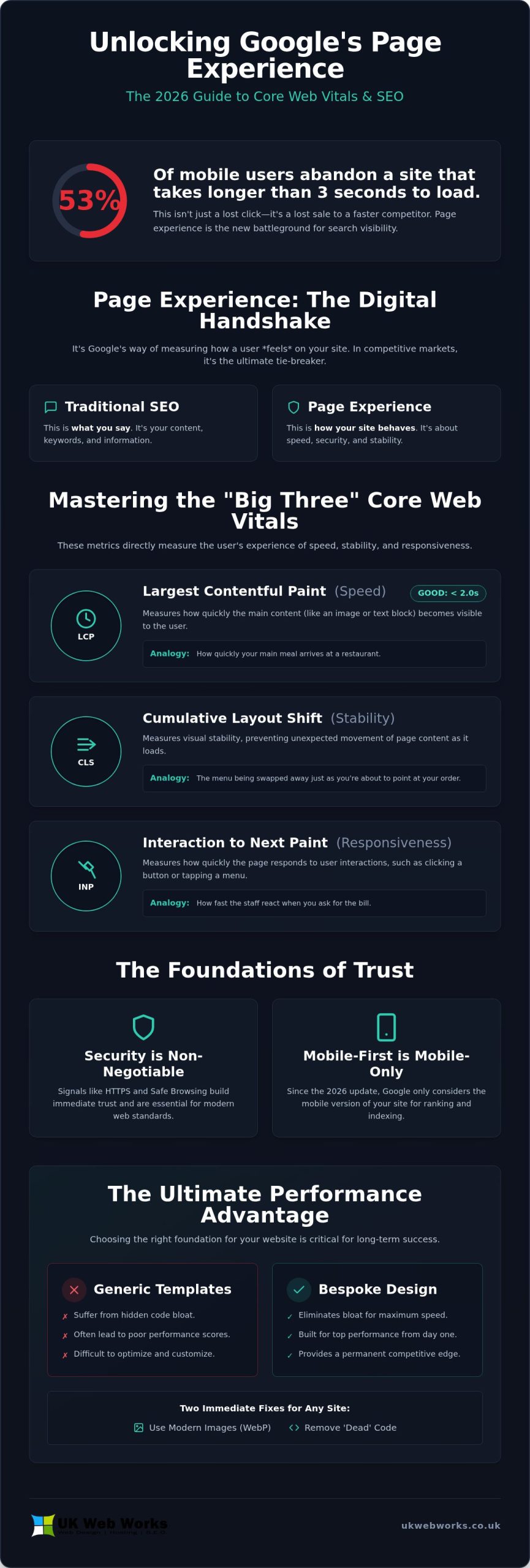
Over 53% of mobile users will abandon your website if it takes longer than three seconds to load. This isn’t just about losing a click. It’s about losing a sale to a competitor who’s already optimized their site. If you’re wondering how to improve google page experience score after the recent 2026 updates, you’re not alone. Many business owners feel overwhelmed by technical jargon, yet the reality is that Google now requires a Largest Contentful Paint (LCP) of under 2.0 seconds to be considered “good.”
We understand that you’d rather focus on running your business than decoding metrics like Interaction to Next Paint. It’s perfectly normal to feel concerned about falling behind, especially when search visibility in Yorkshire depends so heavily on these signals. This guide is designed to be your jargon-free roadmap. You’ll learn exactly how to boost your website’s performance and search rankings using Google’s latest experience signals. We’ll provide a clear plan of action you can hand straight to your web developer to ensure your site is fast, secure, and ready to climb the rankings.
Key Takeaways
- Understand why Google treats page experience as a “digital handshake” and a crucial tie-breaker for local search rankings in competitive markets.
- Learn how to improve google page experience score by mastering the “Big Three” metrics—LCP, CLS, and INP—using a simple restaurant analogy to simplify technical concepts.
- Discover why security foundations like HTTPS and Safe Browsing are now non-negotiable for building long-term trust with customers across Yorkshire.
- Identify immediate technical fixes, such as switching to modern image formats like WebP and removing “dead” code to streamline your website performance.
- See why choosing bespoke web design over generic templates eliminates hidden code bloat and provides a permanent performance advantage from day one.
What is Google Page Experience and Why Does It Matter in 2026?
Google Page Experience isn’t just a technical checklist. It’s a collection of signals that tell Google how a real person feels when they visit your site. While keywords still matter, they’re no longer the only factor in winning the top spot. In 2026, Google looks at everything from loading speed to mobile usability to decide if your site deserves a visitor’s time. Think of it as a digital handshake. If your site is slow or hard to use, you’re essentially turning customers away before they’ve even read a word of your content.
In a competitive local market, this score often acts as the ultimate tie-breaker. If you and your competitor both have great reviews and similar services, Google will reward the business that provides a smoother, faster experience. Learning how to improve google page experience score is no longer optional. It’s a direct way to reduce your bounce rate and turn more visitors into enquiries. A site that respects a user’s time is a site that converts.
Beyond ranking, a healthy score signals that your business is reliable. When a website loads instantly and remains stable, it builds immediate trust. We’ve seen that websites passing these checks often see significant improvements in user engagement. Google’s goal is to keep searchers happy, and by aligning your site with these standards, you’re making it easier for Google to recommend you.
The Difference Between SEO and Page Experience
SEO is what you say; Page Experience is how your site behaves. You can have the most informative blog posts in the world, but if your site takes five seconds to load, people won’t wait to read them. When a user gets frustrated, they leave. Google’s algorithm tracks this behavior. If people consistently “bounce” back to the search results, your rankings will suffer. We often see businesses with fantastic content struggle to rank because their technical foundation is shaky. A successful website needs both great words and a professional, high-quality build to keep users engaged.
The 2026 Update: What Has Changed Recently?
The landscape shifted significantly following the March 2026 core update. Google’s AI now interprets “helpfulness” through the lens of speed and responsiveness. Mobile-first indexing is now the only indexing that matters. This means the mobile version of your site is your only version in Google’s eyes. Tools like Google PageSpeed Insights are essential for identifying where your site is lagging. We’ve seen older metrics retired in favor of more holistic signals that measure actual user interaction. If you aren’t monitoring how to improve google page experience score, you risk falling behind competitors who are already prioritizing these user-centric updates. Integrity in 2026 means ensuring your digital presence is as efficient as your physical service.
Mastering the Core Web Vitals: LCP, CLS, and INP
Core Web Vitals are the heartbeat of your website’s health. While “page experience” sounds like a broad term, Google breaks it down into three specific metrics that measure speed, stability, and responsiveness. Think of these as the “Big Three.” If you’re looking for how to improve google page experience score, this is the place to start. These metrics carry the most weight because they directly track how a user interacts with your pages. You can find your current scores easily using free tools like Google Search Console or PageSpeed Insights.
To make these technical terms easier to understand, we often use a restaurant analogy. Imagine you’re visiting a popular bistro in Hull. LCP is like the seating speed; how long does it take for your main meal to arrive? CLS is the menu stability; does the waiter swap the menu while you’re trying to point at a dish? INP is the service responsiveness; when you ask for the bill, how fast does the staff react? If any of these fail, the diner leaves unhappy. Your website works the same way. If you’re unsure where your site stands, consider letting us audit your technical health to find the bottlenecks.
LCP (Largest Contentful Paint): The Speed Metric
LCP measures how fast the “main stuff” on your page appears. This could be your hero image or a large block of text. Following the March 2026 update, Google tightened this threshold. A “Good” score is now under 2.0 seconds, down from the previous 2.5 seconds. Common culprits for a slow LCP include unoptimized high-resolution images and sluggish server response times. If your main content takes too long to load, visitors will assume the site is broken and head back to the search results.
CLS (Cumulative Layout Shift): The Stability Metric
We’ve all experienced the frustration of a page jumping around just as we’re about to click a button. This “annoying movement” is what CLS measures. It often happens when images or ads don’t have defined dimensions in the code, forcing the rest of the content to shift as they load. To maintain a “Good” rating, your CLS score must be under 0.1. Ensuring your buttons and links stay put is a vital part of how to improve google page experience score and build user trust.
INP (Interaction to Next Paint): The Responsiveness Metric
INP replaced the older FID metric back in March 2024, yet many guides still haven’t caught up. It measures the time it takes for a site to react when a user actually does something, like clicking a link or opening a menu. A responsive site should react in under 200 milliseconds. Bloated WordPress plugins are the most common reason for a poor INP score. They add “heavy” scripts that keep the browser too busy to respond to user clicks. Following practical steps for improving page experience often involves stripping away these unnecessary elements to keep your site lean and fast.
Security and Accessibility: The Foundations of Trust
Security and accessibility are the bedrock of a professional website. While we’ve discussed technical metrics like Core Web Vitals, these trust-based factors are just as critical. If a user doesn’t feel safe on your site, they won’t stay long enough to see how fast it loads. Google’s algorithm prioritizes sites that protect their visitors and treat them with respect. For any Hull or Yorkshire business, showing that you value customer privacy is the first step in building a long-term relationship with your local audience.
Safe Browsing is a key part of this ecosystem. It’s a service Google uses to identify sites that might host malware or deceptive content. If your site is compromised, Google will flag it with a warning screen, which effectively kills your search visibility and reputation overnight. Maintaining a clean, secure site is a fundamental part of how to improve google page experience score. Accessibility is also gaining weight. Ensuring your site follows Web Content Accessibility Guidelines (WCAG) means you’re not excluding potential customers with visual or hearing impairments, which Google views as a sign of a high-quality, inclusive business.
Moving from HTTP to HTTPS
Serving your site over HTTPS is no longer a suggestion; it’s a requirement. If your URL starts with “http” instead of “https,” browsers like Chrome display a “Not Secure” warning. This tells potential clients your site isn’t trustworthy. Checking your SSL status is a simple way how to improve google page experience score while protecting your brand. A correctly configured certificate encrypts data and provides a measurable SEO boost for your local business.
Managing Pop-ups and Overlays
Google calls aggressive newsletter pop-ups “intrusive interstitials” and penalizes sites that use them. If a pop-up covers main content or makes mobile navigation difficult, your score will drop. Trigger overlays based on user intent, like reaching the bottom of a page, rather than on entry. You must also balance these with legal GDPR cookie banners, ensuring they remain as unobtrusive as possible to keep the user experience smooth.
5 Practical Steps to Improve Your Score Today
Improving your score doesn’t have to be a mystery. It’s about consistent maintenance and making smart technical choices. If you’ve been wondering how to improve google page experience score, start with these five actionable steps. Each one addresses a specific bottleneck that could be holding your business back in the search results. These are not just technical tweaks; they are investments in your customer’s journey.
- Optimise your images: Move away from old JPEGs and PNGs. Formats like WebP and AVIF offer much better compression without losing quality.
- Clean up your code: Remove “dead” CSS and JavaScript. Many sites carry around extra code from old plugins that they no longer use, which adds unnecessary weight.
- Upgrade your hosting: Budget hosting at a few pounds a month often leads to slow server response times. This can cost you thousands in lost enquiries.
- Implement Caching: Use server-side caching to store parts of your site on a visitor’s device. This makes their next visit feel nearly instantaneous.
- Prioritise “Above the Fold”: Ensure the content at the top of your page loads first. This gives users something to read while the rest of the page finishes in the background.
Taking these steps ensures your site is lean and efficient. If you’re finding the technical side a bit daunting, get in touch for a professional speed audit. We can help you identify exactly what’s slowing you down.
Why Local UK Hosting Matters for Speed
Physical distance is a major factor in website speed. If your target customers are in Leeds or Hull, but your server is in the United States, your data has to travel thousands of miles for every click. This delay adds up. Our managed web hosting uses reliable UK-based data centres to keep your site close to your audience. This proximity significantly improves your LCP scores and provides a more stable connection for local users.
Image Optimization Without Losing Quality
Images are usually the heaviest part of any webpage. Use tools like TinyPNG to compress your files before you upload them to your site. You should also set explicit width and height attributes in your code. This tells the browser exactly how much space to reserve, which prevents the content from jumping around as the image loads. Finally, implement “Lazy Loading.” This ensures that images only load when a user actually scrolls down to see them, keeping the initial page load light and fast. This is a simple but effective way how to improve google page experience score without needing a total site redesign.
Bespoke Design: The Ultimate Page Experience Shortcut
Fixing a slow website is often like trying to tune an old engine that wasn’t built for speed. You can add parts and clean filters, but the underlying structure remains the same. This is the challenge with off-the-shelf templates. They are designed to be everything to everyone, which means they come packed with “code bloat”, which refers to the extra scripts and styles you’ll never actually use. If you’re serious about how to improve google page experience score, starting with a clean slate is the most effective shortcut you can take. For those seeking expert custom builds, lctechsolutions.etsy.com offers professional development services to ensure your site is built for maximum efficiency.
Choosing bespoke web design in Hull ensures your site is built for performance from day one. Instead of fighting against a template’s limitations, we build only what your business specifically needs. This lean approach naturally results in faster loading times and better stability. It’s much easier to maintain a high score when the foundation is solid than it is to constantly patch a failing template build. We believe in craftsmanship, and a custom-built site is the digital equivalent of a well-made tool.
Bespoke vs. Templates: The Performance Gap
Templates are convenient, but they carry a hidden cost. Because they have to cater to thousands of different users, they include hundreds of features your specific business doesn’t need. This weight slows down your LCP and can destroy your INP scores. Custom WordPress development allows us to target specific Core Web Vitals with precision. We write clean, efficient code that prioritizes your content, ensuring your site meets the strict 2026 standards. The long-term ROI of a custom-built site comes from higher search rankings and a significantly better conversion rate. It’s an investment in your business’s future, not just a one-off cost. For businesses that require more complex, individual software solutions beyond standard web design, learn more about elevenworks and their expertise in high-performance digital engineering.
Partnering with a Local SEO Agency
We don’t believe in hiding behind complex terminology. As a dedicated SEO agency in Hull, our focus is on direct, honest advice that helps your business grow. We integrate page experience into every strategy we develop, ensuring your technical health and your content work together seamlessly. We’ve seen many businesses wait until their rankings drop before taking action. Ongoing maintenance is always more cost-effective than a total SEO recovery project. We prefer to have an open conversation about your site’s health now, helping you stay ahead of competitors in the Yorkshire market. Knowing how to improve google page experience score is part of our commitment to your long-term success and your digital integrity.
Take Control of Your Digital Performance Today
Google’s standards for 2026 are clear. They prioritize speed, stability, and security above all else. By focusing on Core Web Vitals and eliminating code bloat, you aren’t just pleasing an algorithm. You’re making life easier for your customers. Understanding how to improve google page experience score is the first step toward a more visible and profitable business.
We know technical updates can feel like a moving target. That’s why we focus on delivering bespoke designs built specifically for 2026 performance standards. When you work with us, you get direct access to local experts in Hull and East Yorkshire who speak your language. We offer fixed-price projects with no hidden technical fees, so you always know exactly where you stand. Our goal is to make the web simpler for you.
Don’t let a slow website hold your business back or hand an advantage to your competitors. Get a jargon-free website health check from UK Web Works today. We’re ready to help you build a faster, more reliable presence that your customers will truly value.
Frequently Asked Questions
How do I check my Google Page Experience score for free?
You can check your score for free using Google Search Console or Google PageSpeed Insights. These tools provide a direct look at how Google views your site’s performance. Search Console is particularly useful because it shows “field data” based on how real users experience your site over time. PageSpeed Insights offers a snapshot of your current performance and provides a list of technical improvements to help you understand how to improve google page experience score.
Does a bad page experience score mean I will lose all my rankings?
A poor score doesn’t mean you’ll disappear from search results, but it does make ranking much harder. Google still prioritizes high-quality, relevant content above all else. However, if your content is similar to a competitor’s, a better page experience score often acts as the deciding factor. Think of it as a competitive advantage that ensures your hard work on content isn’t wasted by a slow or frustrating technical setup.
What is a good LCP score for a UK business website?
As of the 2026 updates, a “Good” Largest Contentful Paint (LCP) score is now under 2.0 seconds. This is a tighter requirement than in previous years. For a UK business, achieving this means your main content should be visible almost instantly. If your score falls between 2.0 and 3.0 seconds, it “Needs Improvement.” Anything over 3.0 seconds is considered “Poor” and likely impacts your conversion rates and search visibility.
Can I fix my Core Web Vitals using just WordPress plugins?
Plugins can help with basic tasks like image compression, but they aren’t a magic fix for Core Web Vitals. In many cases, adding too many optimization plugins actually increases “code bloat” and slows your site down further. Real improvements usually require cleaning up your theme’s code and ensuring your hosting is up to standard. Relying solely on plugins is rarely the best way how to improve google page experience score for the long term.
How often does Google update the Page Experience signals?
Google updates its ranking systems daily, but major changes to Page Experience signals typically arrive through core updates a few times a year. For example, the shift to a 2.0-second LCP threshold occurred in early 2026. It’s best to monitor your Search Console reports monthly. This steady approach helps you catch small issues before they turn into significant ranking drops, keeping your digital presence stable and reliable for your customers.
Is mobile-friendliness still part of the page experience score in 2026?
Mobile-friendliness remains a foundational part of the score because Google now uses mobile-first indexing exclusively. This means Google only looks at the mobile version of your site to determine your rankings. If your site is difficult to navigate on a smartphone or has buttons that are too close together, your score will suffer. Ensuring your site is responsive and easy to use on small screens is essential for any modern business.
Why is my interaction to next paint (INP) score so low?
A low INP score usually happens because your website’s main thread is too busy processing “heavy” scripts. When a user clicks a menu or a button, the browser is stuck finishing other tasks before it can respond. This delay makes your site feel sluggish and unresponsive. Removing unnecessary tracking scripts or optimizing how your JavaScript loads is often the most direct way to fix this and provide a smoother experience.
How long does it take to see ranking improvements after fixing my score?
You should expect to see changes in your official score after about 28 days. This is because Google uses a rolling average of real user data to calculate your Core Web Vitals. While technical tools might show immediate speed improvements, the ranking benefit follows once Google has gathered enough “field data” to confirm the fix is permanent. Patience is key; consistent technical health leads to steady growth in search visibility.