
Imagine logging on to check your latest sales only to find your homepage replaced by a “Google Blacklisted” warning or a wall of broken code. It’s a gut-wrenching moment that leaves almost every business owner asking: “my wordpress site has been hacked what do i do?” With an estimated 13,000 WordPress sites hacked every single day in 2026, you’re certainly not alone in this situation. We understand the immediate panic you’re feeling. You’re likely worried about losing years of customer data, watching your revenue vanish while the site is down, and feeling overwhelmed by the technical complexity of the fix.
We’re here to help you take a deep breath. This guide is a calm, jargon-free roadmap designed to help you reclaim your website, wipe out malicious malware, and restore your professional reputation. We believe that website recovery isn’t just about deleting bad files; it’s about a methodical restoration of trust and security. We’ll walk you through the exact steps to identify the breach, clean your server, and harden your digital perimeter to ensure your business stays protected. You’ve worked hard to build your online presence, and we’re going to help you get it back on solid ground.
Key Takeaways
- Learn how to isolate your website immediately to protect your visitors and stop the spread of malicious code.
- Find a clear, step-by-step answer to the question “my wordpress site has been hacked what do i do” without needing to be a technical expert.
- Understand the specific pros and cons of restoring from a backup versus performing a manual malware clean.
- Discover the essential security firewalls and update routines that harden your digital perimeter against future exploits.
- See how professional maintenance plans offer a proactive way to monitor your site and prevent breaches before they happen.
Immediate Damage Control: What to Do in the First 30 Minutes
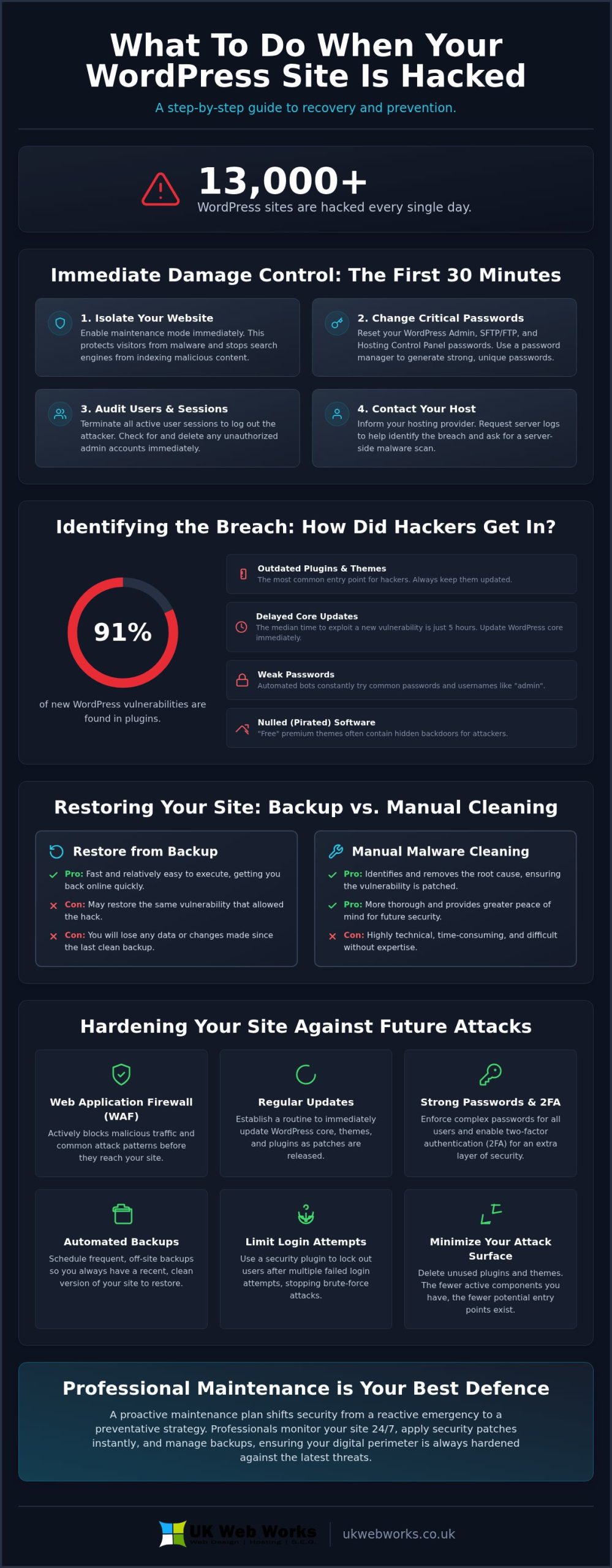
Seeing your business website compromised is a shock, but your first 30 minutes are critical. Instead of frantically clicking through files, your priority is to stop the bleeding. Most hacks are automated attacks carried out by bots rather than personal vendettas. This means they follow predictable patterns that you can reverse with a calm, methodical approach. When you’re asking yourself, my wordpress site has been hacked what do i do, the answer is to isolate the site immediately. Put your website into maintenance mode or replace the homepage with a simple “coming soon” page. This protects your visitors from malware and prevents search engines from indexing malicious content that could lead to a blacklist.
Next, you need to secure your “Big Three” passwords. These are your WordPress Admin account, your SFTP/FTP credentials, and your hosting control panel login. Use a password manager to generate long, complex strings for each. While you’re doing this, document everything you see. Take screenshots of defaced pages, weird error messages, or suspicious pop-ups. These records are vital if you need to file an insurance claim or if you decide to hand the recovery over to a professional developer later. For a broader context on why these vulnerabilities exist, you can consult this WordPress security overview which details common platform risks.
Securing Your Access Points
Once you’ve changed your main logins, you must dig a level deeper. Go into your wp-config.php file and reset your database password. Hackers often scrape this file to maintain access even after you’ve changed your admin password. After updating the database credentials, look for a way to terminate all active user sessions. This effectively kicks every logged-in user out of the site, including the attacker. Finally, audit your user list. Look for new, unauthorised admin accounts with strange email addresses and delete them instantly.
Communicating with Your Hosting Provider
Your hosting provider is your biggest ally in the first hour. Contact their support team and ask for your server logs. These logs are a paper trail that helps identify exactly how the hacker got in. Don’t be surprised if your host has already suspended your account. They do this to protect other sites on the same server from getting infected. It’s a standard procedure, not a punishment. Ask them to run a clean server-side scan using their internal security tools. This can often pinpoint the exact files that have been modified, giving you a clear starting point for the cleanup.
Identifying the Breach: How Did the Hackers Get In?
Now that you’ve stabilised the situation, you’re likely still wondering: “my wordpress site has been hacked what do i do next?” To prevent a repeat performance, we need to find the hole in the fence. In 2025, a staggering 91% of new WordPress vulnerabilities were found in plugins. This isn’t a coincidence. Hackers know that while the core software is robust, the thousands of third-party add-ons are often the weakest link. If you’ve been following a step-by-step recovery guide, identifying the entry vector is the most critical step for long-term security.
Automated bots are constantly “knocking” on your login door. If you use a simple password or a common username like “admin”, you’re essentially leaving the door unlocked. Beyond passwords, skipping core updates is a massive risk. In 2025, over 11,000 new vulnerabilities were discovered in the ecosystem. When a patch is released, the median time for exploitation is just five hours. If you aren’t updating immediately, you’re giving hackers a wide window of opportunity. Sometimes the problem isn’t even your site; it’s an insecure hosting environment where a breach on a neighbouring site can spill over into yours.
The Role of Vulnerable Software
Many business owners are tempted by “nulled” versions of premium themes. These are pirated copies that often come pre-loaded with malicious backdoors. Similarly, abandoned plugins that haven’t seen an update in over 12 months are a playground for attackers. This is why we advocate for Bespoke Website Design. When your site is built with a clean, minimal code base rather than a bloated, generic theme, your attack surface shrinks significantly. If you’re tired of the constant worry, you can reach out to our team for a more secure approach.
Social Engineering and Phishing
Sometimes the breach doesn’t happen on your site at all. You might receive a fake “WordPress Security Update” email that looks official but actually leads to a credential-stealing login page. Additionally, if your local computer is infected with malware, it can leak your SFTP credentials directly to hackers. This is why we recommend implementing Two-Factor Authentication (2FA) as a vital second line of defence. Even if a hacker steals your password, they can’t get in without that secondary code on your phone. Understanding these entry points is the only way to answer the question: my wordpress site has been hacked what do i do to stop it happening again?
Restoring Your Site: Backup vs. Manual Cleaning
Once you’ve identified how the breach happened, you face a fork in the road. You need to decide whether to restore from a backup or roll up your sleeves for a manual clean. If you’re asking “my wordpress site has been hacked what do i do to get it back online quickly,” a backup is usually the first answer. However, you must avoid the common “Backup Trap.” Many business owners restore a version from 24 hours ago, only to find the site hacked again by lunchtime. This happens because attackers often install backdoors weeks before they actually trigger the visible part of the hack. This choice is often the hardest part of answering “my wordpress site has been hacked what do i do” because it involves a trade-off between speed and absolute certainty.
A 2026 report showed that 69.6% of compromised WordPress sites contain active backdoors installed by attackers. If your backup is also infected, you’re just inviting the intruder back in. This is where you have to balance the need for speed with the need for data integrity. Losing a few days of blog posts or customer orders is painful, but it’s often better than a permanent cycle of reinfection. Following website security best practices means verifying the cleanliness of your data before you trust it again. We always recommend checking the “last modified” dates on your server files to see if they align with when you first noticed the breach.
How to Safely Restore a Backup
Don’t just hit “restore” in your hosting panel. Instead, move your backup to a staging environment first. This is a private copy of your site where you can test things safely without affecting your live visitors. Once it’s there, scan the files for suspicious PHP functions like “eval” or “base64_decode.” These are frequently used to hide malicious scripts. You should also compare your site’s current files against a fresh, clean install of the WordPress core to spot any unexpected discrepancies in the file structure.
When Manual Cleaning is Necessary
If you don’t have a backup, or if every version you have is tainted, manual cleaning is your only option. Start by replacing the /wp-admin/ and /wp-includes/ folders with fresh copies from a clean WordPress download. These folders should never contain your personal data, so they are safe to swap. You’ll also need to check your .htaccess and index.php files for injected code. Hackers love to hide redirects here that send your visitors to malicious sites. Finally, look through your database for suspicious links or scripts hidden within your posts and pages. It’s a meticulous process, but it’s the only way to be 100% sure the intruder is gone.
Hardening Your WordPress Site Against Future Attacks
Reclaiming your website is a massive relief, but your work isn’t finished until you’ve built a stronger perimeter. If you’ve spent the last few hours frantically searching “my wordpress site has been hacked what do i do”, you likely never want to experience that stress again. Recovery is about fixing the past; hardening is about securing your future. Think of your website like a physical shop. You wouldn’t just clean up after a break-in and leave the front door unlocked. You’d install a better alarm system and stronger locks. In the digital world, that starts with a reputable security firewall.
Tools like Wordfence or Sucuri act as your digital bouncer. They monitor traffic in real-time and block suspicious IP addresses before they can even attempt a login. Alongside a firewall, you must commit to a strict update schedule. As we discussed earlier, the window between a vulnerability being found and being exploited is often less than five hours. If you aren’t updating your core software, plugins, and themes immediately, you’re leaving a window open for attackers. Additionally, ensure your site has a valid SSL certificate. This doesn’t just help with SEO; it encrypts the data travelling between your server and your visitors, making it much harder for hackers to intercept sensitive information.
Technical Hardening Tactics
There are several “under the hood” changes that make your site a much harder target. Start by disabling file editing within your WordPress dashboard. This simple tweak prevents a hacker from changing your theme or plugin code even if they manage to steal an admin password. You should also audit your file permissions. Ideally, your files should be set to 644 and your folders to 755. These settings ensure that only the necessary processes can write to your files. Finally, consider implementing a Content Security Policy (CSP). A CSP tells the browser which scripts are safe to run, which effectively blocks many types of malicious code injections.
Ongoing Maintenance Habits
Security isn’t a one-time task; it’s a continuous process. Many business owners find that investing in website maintenance packages is significantly cheaper than the cost of a single hack recovery. These plans provide proactive monitoring and regular updates, so you don’t have to manage the technical details yourself. We also recommend moving away from cheap, unmanaged shared hosting. Managed hosting providers often include server-level security that stops attacks before they even reach your WordPress installation. To stay ahead of new threats, try to conduct a formal security audit every quarter to check for abandoned plugins or weak user passwords. If you’d like a professional eye to review your current setup, you can contact our Hull-based experts today for a comprehensive security assessment.
Why Professional WordPress Maintenance is Your Best Defence
Recovering from a security breach is an exhausting experience. If you’ve just spent your weekend frantically typing “my wordpress site has been hacked what do i do” into search engines, you already know the toll it takes on your productivity and mental energy. Professional maintenance plans are designed to remove that weight from your shoulders entirely. Instead of reactive panic, you benefit from 24/7 security monitoring that spots threats before they manifest as a broken site. If the worst does happen, you aren’t left shouting into the void of an automated global helpdesk. Our Hull-based team handles the cleanup for you, providing the kind of local accountability and direct communication that large hosting corporations simply cannot match.
There is also a significant hidden benefit to professional security hardening: improved performance. A secure site is almost always a faster, more stable site. By stripping out vulnerable, bloated plugins and implementing clean, efficient code, we ensure your website delivers a better experience for your customers. You aren’t just paying for a digital insurance policy. You’re investing in a high-performance business tool that stays online and works harder for your brand; to ensure your wider marketing strategy is just as resilient, you can discover Brand Central for strategic growth support. This methodical approach ensures that your digital presence remains an asset rather than a liability.
Managed Support vs. DIY Security
Many business owners attempt the DIY route to save costs, but digital security is a moving target that never rests. With over 11,000 new vulnerabilities discovered in 2025 alone, keeping up with the necessary patches while running a company is nearly impossible. We take the technical burden off your shoulders by taking a proactive approach. We patch vulnerabilities the moment they are disclosed, often before hackers even have a chance to exploit them. We pride ourselves on our jargon-free approach to web maintenance. We explain exactly how we’re protecting your site using plain English, so you always feel in control without needing a computer science degree.
Get Your Site Back on Track Today
Don’t let a temporary breach ruin the reputation you’ve worked so hard to build in Hull, York, or Leeds. A hacked site can lead to Google blacklisting and a loss of customer trust that takes months to rebuild. We offer a fixed-price security audit and recovery plan to get your business back on track quickly and safely. It’s time to move past the stress of asking “my wordpress site has been hacked what do i do” and step into a position of total digital confidence. You can protect your digital investment with our maintenance plans and ensure your website stays clean, fast, and secure for the long term.
Take Control of Your Digital Security Today
Recovering your website is about more than just fixing a broken page; it’s about reclaiming your professional reputation and building a foundation that hackers can’t crack. We’ve walked through the immediate steps of site isolation, the importance of identifying specific entry vectors like vulnerable plugins, and why a “clean” restore is always better than a rushed one. By moving from a state of reactive panic to a methodical hardening of your digital perimeter, you ensure your business remains resilient against the thousands of automated attacks occurring every day.
If you’re still feeling overwhelmed and asking “my wordpress site has been hacked what do i do”, you don’t have to face the technical cleanup alone. As bespoke WordPress specialists based in Hull, we provide fixed-price maintenance and support to get you back on track without the stress. We offer no-nonsense, jargon-free technical advice that puts your business goals first. You can get expert help restoring your hacked WordPress site today and finally put this breach behind you. Your website is a vital investment; let’s work together to keep it safe, fast, and fully under your control.
Frequently Asked Questions
How do I know for sure if my WordPress site has been hacked?
You can confirm a hack by looking for “Google Blacklist” warnings or noticing your site redirects to unrelated, often suspicious, websites. Check your Google Search Console for security notifications. You might also see new, unauthorised admin users in your dashboard or find strange files in your hosting account that you didn’t upload. Sudden drops in site performance or broken layouts are also common red flags.
Will Google penalise my site if it gets hacked?
Google will likely flag your site as “dangerous” to protect users, which causes a significant drop in search rankings. This isn’t a permanent penalty, but your organic traffic will suffer until the malware is completely removed. Once your site is clean, you must request a review through Google Search Console to have the warning lifted and restore your visibility in search results.
Can I fix a hacked WordPress site myself for free?
You can clean a site for free by manually replacing core files and scanning for malicious code yourself. However, this is time-consuming and carries the risk of missing hidden backdoors. If you’re asking “my wordpress site has been hacked what do i do” and you aren’t comfortable with code, a professional cleanup is often the safer, faster choice to avoid a cycle of reinfection.
How long does it take to clean a hacked WordPress site?
A professional cleanup typically takes between 24 and 48 hours to complete properly. While you can restore a backup in minutes, a full forensic clean involves scanning every file and database entry for hidden scripts. Rushing the process often leads to the site being hacked again within days because the original entry point wasn’t closed or a backdoor was left behind.
My host suspended my site because of malware, what should I do?
Contact your host’s support team immediately to confirm which files were flagged as malicious. Hosts suspend sites to prevent malware from spreading to other users on the same server. Ask them for a list of infected files and whether they offer any internal tools to help with the cleanup. You’ll need to prove the site is clean before they’ll reactivate your account.
Are some WordPress themes more likely to be hacked than others?
Do I need to tell my customers that my site was hacked?
You must inform your customers if you believe their personal data was compromised during the breach. Under UK GDPR rules, you have a legal obligation to report serious data breaches to the ICO within 72 hours. Being transparent helps maintain trust. Even if no data was stolen, a quick, honest update can prevent rumours and show you take their security and privacy seriously.